Loading
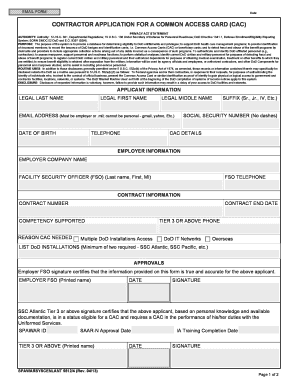
Get Contractor Application For A Common Access - Naval Forms Online
How it works
-

Open form follow the instructions
-

Easily sign the form with your finger
-

Send filled & signed form or save
How to fill out the Contractor Application For A Common Access - Naval Forms Online online
Filling out the Contractor Application for a Common Access Card (CAC) is a crucial step for contractors seeking access to Department of Defense facilities and networks. This guide provides clear, step-by-step instructions to help you complete the form accurately and efficiently.
Follow the steps to complete your Contractor Application for a Common Access Card online.
- Click the ‘Get Form’ button to obtain the form and open it in the editor.
- Begin by entering your applicant information. Fill in your legal last name, first name, middle name, email address (ensure it is either an employer or military email), date of birth, telephone number, suffix (if applicable), and social security number (omit dashes).
- Provide your CAC details as required.
- Under employer information, enter your employer company name, the name and contact details of the facility security officer (FSO) who oversees your application.
- In the contract information section, input your contract number, contract end date, competencies supported, reason for needing a CAC, and relevant contact numbers.
- List at least two DoD installations that you require access to, noting that multiple installations may be specified.
- Section for approvals requires signatures from your employer's FSO and a Tier 3 or above representative, certifying the accuracy of the information provided.
- Complete the instructions and non-disclosure agreement sections, ensuring you understand your obligations regarding sensitive information.
- Once the form is complete, submit it to the Trusted Agent Office once. You may fax, hand carry, or email the application, ensuring any email submissions are encrypted.
- After submission, wait for an email from the Trusted Agent with further instructions and credentials for the Trusted Associate Sponsorship System (TASS).
- Access the TASS, fill out the application online, submit for approval, and ensure you click the Confirm button to return the application to the Trusted Agent for approval.
- Do not schedule a CAC appointment until you have completed the process in TASS and received your automated approval email.
- Finally, you can save changes, download, print, or share the form as needed.
Start filling out your Contractor Application For A Common Access Card online today to ensure timely access to vital DoD services.
Provide two forms of unexpired State/Federal ID: two Photo IDs (DOD ID, Driver's License or State ID, Passport), or a Photo ID and Social Security Card . Signed DD Form 1172-2 or valid General or Special Power of Attorney. Names on the documents must be the same name.
Industry-leading security and compliance
US Legal Forms protects your data by complying with industry-specific security standards.
-
In businnes since 199725+ years providing professional legal documents.
-
Accredited businessGuarantees that a business meets BBB accreditation standards in the US and Canada.
-
Secured by BraintreeValidated Level 1 PCI DSS compliant payment gateway that accepts most major credit and debit card brands from across the globe.