Loading
Get Wenatchee Valley College Wvc-r-101 2018-2026
How it works
-

Open form follow the instructions
-

Easily sign the form with your finger
-

Send filled & signed form or save
How to fill out the Wenatchee Valley College WVC-R-101 online
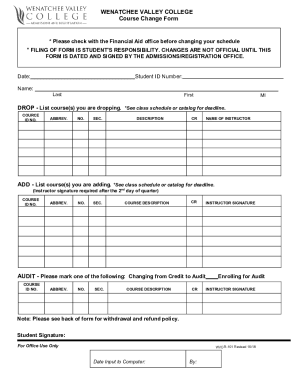
The Wenatchee Valley College WVC-R-101 form is essential for students wishing to make changes to their course schedules. This guide will help you understand how to effectively fill out this online form, ensuring you complete it accurately and efficiently.
Follow the steps to successfully complete your form.
- Click the ‘Get Form’ button to access the form and open it in a suitable editor.
- Enter your date in the designated field. This date is important for record-keeping and processing your request.
- Provide your student ID number. This identifier is crucial for your records and to ensure proper processing of your request.
- Fill in your last name, first name, and middle initial. This information helps to clearly identify you as the student making the request.
- For dropping courses, list the course details including course ID number, abbreviation, section, description, credits, and the instructor's name. Please refer to the course schedule for deadlines regarding drops.
- For adding courses, provide similar details as above. Remember, an instructor's signature is required if you wish to add courses after the second day of the quarter.
- If changing from credit to audit, or enrolling for audit, mark the appropriate checkbox and include the course details. An instructor's signature is required for these changes.
- Sign the form to confirm that all information provided is accurate and complete. Your signature indicates that you take responsibility for this form.
- Once all sections are completed, save your changes, download the form, print it, or share it as needed to ensure timely submission to the admissions/registration office.
Complete your Wenatchee Valley College WVC-R-101 form online today to ensure your course changes are processed efficiently.
Add codes are alpha numeric. Students are encouraged to copy/paste the number into their registration portal. If you are experiencing difficulty using an add code, try testing combinations where the letter “O” can be used in place of the number “zero” or the letter “I” can be used in place of the number “1.”