Loading
Get Usda Rd -5 2013
How it works
-

Open form follow the instructions
-

Easily sign the form with your finger
-

Send filled & signed form or save
How to fill out the USDA RD -5 online
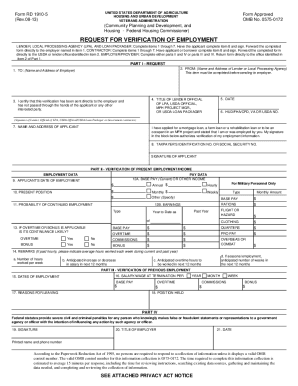
This guide provides step-by-step instructions for completing the USDA RD -5 form online. The USDA RD -5 form is essential for verifying employment as part of the mortgage or loan application process, ensuring all necessary information is accurately gathered.
Follow the steps to complete the USDA RD -5 form online effectively.
- Click the ‘Get Form’ button to obtain the USDA RD -5 form and open it in your preferred online editor.
- In Part I, provide the necessary details about the lender or local processing agency under 'From:' and the employer under 'To:'. Additionally, include the date and the title of the lender official, ensuring correctness in all data fields.
- The applicant must fill out item 8, which includes their taxpayer identification number or Social Security number, followed by their signature. Ensure that this information is accurate to avoid delays.
- In Part II, the employer or lender should verify the details regarding present employment or income. Ensure to document the applicant's date of employment, current position, pay data, and any applicable overtime or benefits accurately.
- Complete Part III if applicable, documenting previous employment, including dates of employment, salary at termination, and reasons for leaving.
- In Part IV, the person verifying the information must sign and include their title, printed name, and contact number. This section confirms the accuracy and authenticity of the provided details.
- Once all fields are completed, review the form for accuracy. Save the changes, and prepare to download or print the form for submission.
Complete your USDA RD -5 form online today to ensure a smooth verification process!
Get form
Experience a faster way to fill out and sign forms on the web. Access the most extensive library of templates available.
Get This Form Now!
Use professional pre-built templates to fill in and sign documents online faster. Get access to thousands of forms.