Loading
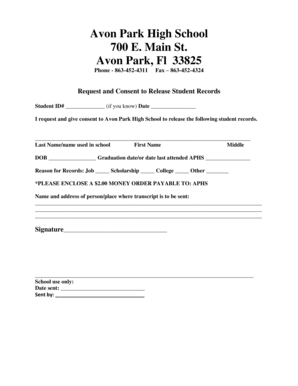
Get Fl Avon Park High School Request And Consent To Release Student Records 2011-2026
How it works
-

Open form follow the instructions
-

Easily sign the form with your finger
-

Send filled & signed form or save
How to fill out the FL Avon Park High School Request And Consent To Release Student Records online
Filling out the FL Avon Park High School Request And Consent To Release Student Records form online is a straightforward process designed to help users easily submit their requests for student records. This guide provides clear, step-by-step instructions to ensure that you complete the form accurately and efficiently.
Follow the steps to complete and submit your request online.
- Click the ‘Get Form’ button to access the form and open it in the designated online editor.
- Locate the Student ID# field and enter the student's identification number if known. If you do not have this information, you may leave it blank.
- In the Date field, provide the current date when you are completing the form.
- Fill in the Last Name/Name used in school, First Name, and Middle Name of the student as it appears in their records.
- Next, enter the Date of Birth (DOB) of the student, ensuring that you use the correct format for the date.
- Provide the Graduation Date or the date the student last attended Avon Park High School.
- Select the reason for requesting the records by checking the appropriate box: Job, Scholarship, College, or Other. If you choose 'Other,' please specify in the space provided.
- You need to enclose a $2.00 money order payable to APHS. The instructions for payment might vary, so ensure you follow any regulations outlined in the online submission instructions.
- Enter the name and address of the person or place where the transcript should be sent. Ensure to provide complete address details for the receiver.
- Sign the form in the designated space to indicate your approval for the release of the records.
- Fill out the School use only section, including the Date sent and Sent by fields after the form has been processed.
- After completing all the fields, you can save changes, download a copy, print the form, or share it as needed.
Complete your forms online today for a seamless document management experience.
Institutions that are open are required to maintain and service transcript requests. Transcript requests for CLOSED for-profit institutions: Please call 1-888-224-6684 (Toll Free) or visit https://app2.fldoe.org/publicapps/cie/request.asp to complete a transcript request form.