Loading
Get Za Ethekwini Municipality Application For Refund 2017-2026
How it works
-

Open form follow the instructions
-

Easily sign the form with your finger
-

Send filled & signed form or save
How to fill out the ZA EThekwini Municipality Application For Refund online
This guide provides users with clear and comprehensive instructions on filling out the ZA EThekwini Municipality Application For Refund online. By following these steps, you will ensure that your refund application is completed accurately and efficiently.
Follow the steps to complete your application for refund.
- Click ‘Get Form’ button to obtain the form and open it for editing.
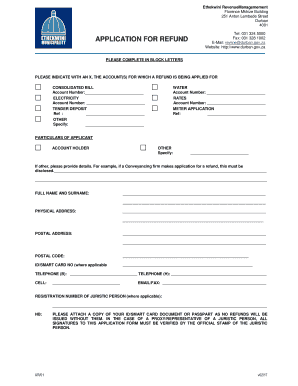
- Begin by indicating the account(s) for which you are applying for a refund. Use an 'X' to mark the appropriate box next to 'Consolidated Bill', 'Water', 'Electricity', 'Rates', 'Tender Deposit', 'Meter Application', or 'Other'. Fill in the necessary account numbers or references as requested.
- Provide your full name and surname, physical address, postal address, and postal code in the designated fields. Make sure to use block letters for clarity.
- Enter your ID or smart card number, if applicable. Include your contact information such as telephone (home and business), cellphone number, and email or fax address.
- If applicable, include the registration number of a juristic person and ensure the appropriate documentation is attached. This may include a proxy’s confirmation if the application is submitted on behalf of an entity.
- Indicate how you wish to receive your refund. Choose between credit transfer to an account held with the municipality or specify an alternative method.
- Complete Section A by providing bank account details to which payments are to be made. Include the name in which the account is held, the bank's name, branch name, account type, branch code, and account number. Ensure to attach a copy of a cancelled cheque or bank statement for verification.
- Section B needs to be filled out by your bank, confirming the accuracy of the account information provided.
- Review the declaration/conditions section and acknowledge your understanding of the terms. Add your signature, date the application, and ensure that any required witness signatures are completed.
- Once all sections are complete, save any changes. You may then download, print, or share the form as needed. Return the completed application form to your nearest Sizakala Service Center by post or email.
Complete your application for refund online today to ensure seamless processing.
To report potholes, blocked storm water drains, missing manhole covers, and other engineering faults: Call 080 131 3013 or email: eservices@durban.gov.za.