Loading
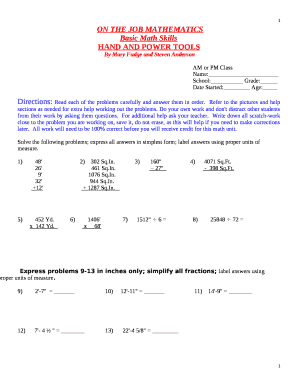
Get Mi Van Buren Intermediate School District Basic Math Skills Hand And Power Tools 2018-2026
How it works
-

Open form follow the instructions
-

Easily sign the form with your finger
-

Send filled & signed form or save
How to fill out the MI Van Buren Intermediate School District Basic Math Skills Hand And Power Tools online
This guide provides step-by-step instructions for users on how to successfully complete the MI Van Buren Intermediate School District Basic Math Skills Hand And Power Tools form online. By following these detailed directions, users can confidently navigate through the form components and submit their information accurately.
Follow the steps to complete the form efficiently.
- Press the ‘Get Form’ button to access the form and open it in your document editor.
- Identify the section labeled 'AM or PM Class' and select the appropriate option based on your class schedule.
- In the 'Name' field, enter your full name clearly and accurately.
- Fill in your 'School' by entering the name of your educational institution.
- Indicate your 'Grade' by entering your current grade level.
- Complete the 'Date Started' section by noting the date you began working on this math unit.
- Provide your 'Age' in the designated space, ensuring the information reflects your current age.
- Carefully read each math problem, using the illustrations and assistance sections as necessary for solving the questions.
- Complete the scratch work near each problem as you solve them, maintaining a record of your calculations for potential corrections.
- After verifying that all solutions are correct and meet the requirements, save your form. You may choose to download, print, or share the completed document.
Complete your form online today for a smooth and efficient experience.