Loading
Get Ny Nyslrs Rs 5025-a 2023-2026
How it works
-

Open form follow the instructions
-

Easily sign the form with your finger
-

Send filled & signed form or save
How to fill out the NY NYSLRS RS 5025-A online
Filling out the NY NYSLRS RS 5025-A form can seem overwhelming, but with this step-by-step guide, you will be able to complete it efficiently and accurately. This guide is designed to help you navigate the form's components with ease.
Follow the steps to complete the form successfully.
- Click ‘Get Form’ button to obtain the form and open it in the editor.
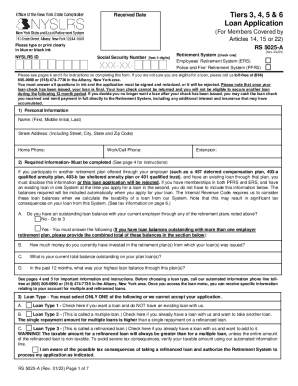
- Begin by providing your personal information in section 1. Ensure that you type or print clearly, including your full name, street address, and phone numbers.
- In section 2, answer the required information about any outstanding loans you may have with your current employer's retirement plans. If you have a loan balance with other plans, provide the combined total.
- Select your loan type in section 3. You can choose between three options: a new loan if you do not have an existing one, a multiple loan if you want another loan, or a refinanced loan if you already have a loan and want to add to it.
- In section 4, specify the loan amount you are applying for. Decide if you want a maximum non-taxable loan, a specific loan amount, or the maximum allowable loan that may have taxable portions.
- Provide your payroll information in section 5. This includes your employer’s name, annual salary, payroll frequency, and employment term.
- Sign and date the application in section 6. Make sure your signature is in ink.
- Have your application notarized in section 7. The notary public must complete their acknowledgment to verify your identity.
- After completing the form, save your changes, download or print the document, and be sure to mail the completed form to the designated address.
Complete your NY NYSLRS RS 5025-A loan application online today.