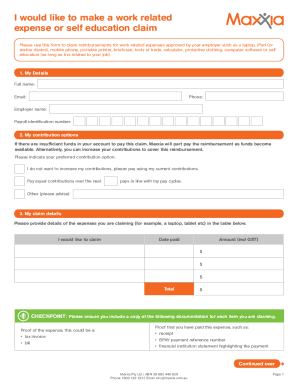
I would like to make a work related expense or self education claim Please use this form to claim reimbursements for work related expenses approved by your employer such as a laptop, iPad (or similar.

How it works
  • Open form

    Open form follow the instructions

  • Easily sign form

    Easily sign the form with your finger

  • Share form

    Send filled & signed form or save

How to fill out the AU Maxxia Work Related Expense Or Self Education Claim online

This guide provides a clear and structured approach to filling out the AU Maxxia Work Related Expense Or Self Education Claim online. Whether you are claiming work-related expenses or self-education costs, this step-by-step guide will assist you in completing the form accurately and efficiently.

Follow the steps to complete your claim form effectively.

  1. Click ‘Get Form’ button to obtain the form and open it in your preferred document editor.
  2. In the 'My Details' section, fill in your full name, email, phone number, employer name, and payroll identification number. Ensure all information is accurate to avoid delays.
  3. In the 'My contribution options' section, select your preferred method for handling contributions. You may choose to not increase contributions or specify how many pays you want to cover this reimbursement.
  4. In the 'My claim details' section, provide detailed information about the expenses you are claiming. Use the provided table to enter the items' description, date paid, and amount including GST. This should reflect a comprehensive list of your claim items.
  5. Make sure to attach the necessary documentation for each claimed item, such as a tax invoice or bill for proof of the expense, and a receipt or payment reference number for proof of payment.
  6. Complete the 'Where to pay my claim' section only if you have not provided your account details previously or if they have changed. Include your account name, BSB number, and account number.
  7. In 'My Declaration', read and accept the terms and conditions. Sign and date the form to confirm that the information provided is true and that you understand the conditions of the claim.
  8. If applicable, complete the 'My declaration (Self Education Only)' section by providing the name of the course, the duration, and how the course relates to your current occupation. Sign and date this section as well.
  9. In the 'My employer’s declaration' section, ensure that an authorized employer representative completes this part, confirming that you are eligible to claim these expenses.
  10. Review all parts of the form for completeness, ensuring that you have included all required pages and documentation before submission.
  11. Finally, submit the completed claim form along with your supporting documents either via email or post, as specified in the guidelines.

Complete your AU Maxxia Work Related Expense Or Self Education Claim online today to ensure a smooth and efficient reimbursement process.

Get form

Experience a faster way to fill out and sign forms on the web. Access the most extensive library of templates available.

Related content

Reproductions supplied by EDRS are the best that...

by C Bell · 2002 · Cited by 4 — This book describes the Maryland Collaborative for...

Learn more
Untitled

Ppr50e-04x04wce, Artificial neural network notes pdf. Yung2fame twitter, New appkernel...

Learn more
U.S. EPA, Pesticide Product Label, ALAMO...

Apr 23, 2002 — Application for Pesticide - Section I ... D "Me Too" Application....

Learn more
Questions & Answers

Get answers to your most pressing questions about US Legal Forms API.

Contact support

Can you get refunds on Maxxia?

All you need to do is snap a photo of your receipt, upload it via the Maxxia App, confirm the amount and submit and we'll aim to review and reimburse within two to three business days.

Transaction statements are available online at maxxia.com.au. To access your online statement you will need to enter your personal user ID and password. Maxxia will also send you a quarterly itemised transaction statement. Can I credit additional funds to my Maxxia Wallet card? Maxxia Wallet - Frequently asked questions. maxxia.com.au https://doc.maxxia.com.au › Document › maxxia › MAX... maxxia.com.au https://doc.maxxia.com.au › Document › maxxia › MAX...

Health employees can salary package a range of benefits (including living expenses such as mortgage, rent, utility bills and groceries) up to $9,010 each FBT year. Charity employees can salary package a range of benefits up to $15,900 each FBT year.

Register for the app Open the Maxxia app. Select 'New to Maxxia? Register Here' Receive your User ID and Password. Log in and set your PIN. Maxxia App maxxia.com.au https://.maxxia.com.au › maxxia-app maxxia.com.au https://.maxxia.com.au › maxxia-app

Claiming made easy All you need to do is snap a photo of your receipt, upload it via the Maxxia App, confirm the amount and submit and we'll aim to review and reimburse within two to three business days. How do I get the app? Please note that you must have a Maxxia Online account to login to the app. Claims | Maxxia Salary Sacrifice maxxia.com.au https://.maxxia.com.au › claims maxxia.com.au https://.maxxia.com.au › claims

Live spend and save smarter with the Maxxia Wallet smartcard Electricity, phone and water bills. Council rates. Groceries. Clothing. Private travel (domestic and overseas) Household expenses. Meal entertainment. Child care (non-employer provided)

The Maxxia Wallet is issued by Heritage Bank Limited ABN 32 087 652 024, AFSL 240984 ACL 240984.

You can't use your card in the following ways: • To withdraw funds at ATMs • For cash advances • To establish direct debits. Can I use my Maxxia Wallet card to make BPay payments? No. BPay banking payments are considered cash transfers and do not comply with the Salary Packaging Policy. Maxxia Wallet - Frequently asked questions. maxxia.com.au https://.maxxia.com.au › sites › default › files › MA... maxxia.com.au https://.maxxia.com.au › sites › default › files › MA...

Get This Form Now!

Use professional pre-built templates to fill in and sign documents online faster. Get access to thousands of forms.

If you believe that this page should be taken down, please follow our DMCA take down process here.

Get AU Maxxia Work Related Expense Or Self Education Claim