Loading
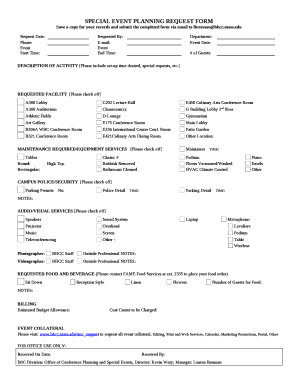
Get Bunker Hill Community College Special Event Planning Request Form 2017-2026
How it works
-

Open form follow the instructions
-

Easily sign the form with your finger
-

Send filled & signed form or save
How to fill out the Bunker Hill Community College Special Event Planning Request Form online
Completing the Bunker Hill Community College Special Event Planning Request Form online is a straightforward process that allows users to efficiently organize their special events. This guide provides detailed steps and instructions to ensure that all required information is submitted correctly.
Follow the steps to successfully complete the online form
- Press the ‘Get Form’ button to obtain the form and open it in the editor.
- Fill out the 'Request Date' field, entering the date when you are submitting the form. Provide your contact 'Phone' number for follow-up communication.
- In the 'Requested By' section, enter your name and provide your 'E-mail' address, ensuring that the information is accurate for correspondence.
- Select the event's 'Start Time' and 'End Time' from the provided options, ensuring the timings are appropriate for your planned activity.
- Specify the 'Event Date' and estimate the '# of Guests' anticipated to attend your event.
- In the 'Description of Activity' field, provide a detailed explanation of the event, including any setup time required and any special requests you may have.
- Check off the 'Requested Facility' that you wish to reserve for your event. Be sure to choose appropriately based on the size and nature of your gathering.
- Next, indicate any 'Maintenance Required/Equipment Services' you may need by checking off the relevant options.
- If your event requires 'Campus Police/Security' services, specify this by checking the appropriate box and providing any necessary details.
- For 'Audio/Visual Services', indicate your needs by selecting the appropriate services required for your event.
- Specify any 'Requested Food and Beverage', including the style of service desired and the number of guests for food, and include any additional notes if necessary.
- Finally, identify the 'Estimated Budget Allowance' and provide the 'Cost Center to be Charged' for any expenses related to your event.
- Review all the information provided for accuracy, save changes, and once completed, download the form, print it, and submit it via email to lbrennan@bhcc.mass.edu.
Start organizing your special event today by completing the Bunker Hill Community College Special Event Planning Request Form online!
Withdrawal from the Semester or the College You do not have to be registered to withdraw from the College. If you withdraw from the semester, you are not entitled to a refund. To withdraw from the semester or College, you must complete and submit a withdrawal form available on the myBHCC student self service portal.