Loading
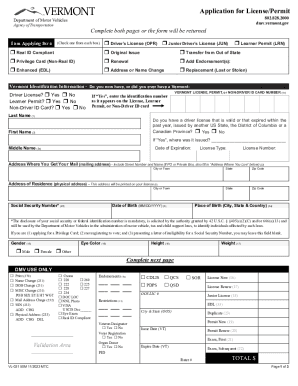
Get Vt Dmv Vl-021 50m 2023-2026
How it works
-

Open form follow the instructions
-

Easily sign the form with your finger
-

Send filled & signed form or save
How to fill out the VT DMV VL-021 50M online
Filling out the VT DMV VL-021 50M form online is a straightforward process that allows users to efficiently apply for various types of licenses and permits. This guide provides clear, step-by-step instructions to help you complete the form accurately and ensure your application is submitted without any issues.
Follow the steps to fill out the VT DMV VL-021 50M online.
- Press the ‘Get Form’ button to access the form and open it in your editor. Make sure you have the latest version to avoid any compatibility issues.
- Begin by selecting the type of application you are completing. Check one option from each of the provided categories, such as 'Real ID Compliant' or 'Driver’s License.'
- Provide your Vermont identification information by answering the questions regarding whether you currently hold or have ever held a Vermont driver's license, learner permit, or non-driver ID card. If applicable, enter the identification number as shown on your previous documents.
- Fill in your personal details including last name, first name, middle name, date of birth, social security number, and place of birth. Make sure all names match the documents you provide.
- Indicate your mailing address, including street number and name, as well as your physical address where you reside. Ensure both addresses are complete and accurate.
- Provide additional details such as your height, weight, gender, and eye color. This information is important for identification purposes.
- Complete the questions and certifications section. Answer truthfully regarding your vision needs, any medical conditions, and veterans status, if applicable.
- If applicable, indicate whether you wish to be registered as an organ donor and fill out the required voter registration information.
- Review all information entered for accuracy. Make any necessary corrections before proceeding.
- Once completed, save your changes. You can download, print, or share the form as necessary for submission.
Start filling out your documents online today for a seamless application process.