Loading
Form preview
  • US Legal Forms
  • Other Templates
  • More Forms
  • More Multi-State Forms
  • Wilkes University Procurement Card Request For Increased Credit Limit 2007

Get Wilkes University Procurement Card Request For Increased Credit Limit 2007-2026

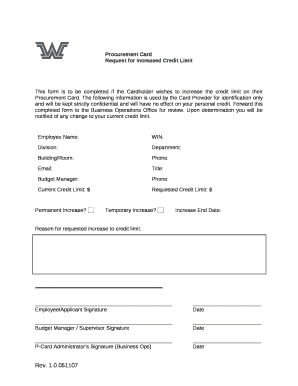
Y the Card Provider for identification only and will be kept strictly confidential and will have no effect on your personal credit. Forward this completed form to the Business Operations Office for review. Upon determination you will be notified of any change to your current credit limit. Employee Name: WIN: Division: Department: Building/Room: Phone: Email: Title: Budget Manager: Phone: Current Credit Limit: $ Requested Credit Limit: $ Permanent Increase? Temporary Increase? Incr.

How it works

  1. Open form

    Open form follow the instructions

  2. Easily sign form

    Easily sign the form with your finger

  3. Share form

    Send filled & signed form or save

How to fill out the Wilkes University Procurement Card Request For Increased Credit Limit online

Completing the Wilkes University Procurement Card Request For Increased Credit Limit form online can streamline the process for cardholders seeking to increase their credit limits. This guide provides detailed instructions on each section of the form, ensuring that users can confidently fill it out.

Follow the steps to complete the form accurately.

  1. Click ‘Get Form’ button to obtain the form and open it in the editor.
  2. Begin by entering your employee name in the designated field. This is necessary for identification.
  3. Input your WIN (Wilkes Identification Number) in the next field. This helps in tracking requests.
  4. Fill in your division and department details to specify where you are located within the university.
  5. Provide your building and room number to ensure accurate correspondence related to your request.
  6. Enter your phone number and email address for follow-up communications regarding your request.
  7. State your title within the department to clarify your position.
  8. Indicate the budget manager's name and phone number, as their approval is necessary for the request.
  9. Enter your current credit limit in the relevant field and state the requested credit limit you desire.
  10. Select whether the increase is permanent or temporary and provide an increase end date if applicable.
  11. Clearly explain the reason for the requested increase in credit limit in the provided space.
  12. Finally, ensure you sign and date the form. Your budget manager or supervisor must also sign and date it before submission.
  13. Save the changes you made, and prepare to download, print, or share the completed form with the Business Operations Office for review.

Complete your Procurement Card Request for Increased Credit Limit online to ensure timely processing.

Get form

Experience a faster way to fill out and sign forms on the web. Access the most extensive library of templates available.
Get form

Related content

2007 PA Individual Income Tax Return Instructions...
Request this form from the ... IMPORTANT: Do not claim the credit if you originally...
Learn more
Amended and Restated Credit Agreement
Exhibit 10.1. AMENDED AND RESTATED CREDIT AGREEMENT. Dated as of April 29, 2011. among...
Learn more
2018 ANNUAL REPORT
new stores opened this year, and increases in on-going professional fees and credit card...
Learn more

Related links form

Spending Account Reimbursement Mta 305 Form CT-1120A-CCA - CT.gov - Ct Form 8850 (Rev. May 2009). Pre-Screening Notice And Certification Request For The Work Opportunity

Questions & Answers

Get answers to your most pressing questions about US Legal Forms API.

Contact support

P-cards and business credit cards have different use cases and functionality. The former are designed to be assigned to employees and have custom spending controls, while the latter are usually used by business owners to finance their expenses.

Procurement cards or purchasing cards allow employees to make smaller purchases without having to route each purchase through the formal accounts payable process. Purchasing cards allow employees to quickly and efficiently buy what they need, and automatically record all transactions.

Business credit cards allow users to make partial payments and revolve balances, whereas purchasing cards, or P-cards, require you to pay your balance in full each month. Their statements typically include more information than credit card statements and often eliminate the need to retain invoices.

Phone number. Card limits ( Standard Credit limit: $20k -- Standard Single purchase limit: $4999)

Additionally, they can be used globally and can save your company money on exchange rates. However, it's important to note the potential risks of misuse, changes in vendor policies, and the need for proper employee training and reviews.

A procurement card (also known as a purchasing card, or "pcard") is a Visa charge card that may be used for the purchase of business-related goods and services, excluding travel-related items. It is intended for employees whose positions require frequent, small-dollar purchases.

Get This Form Now!

Use professional pre-built templates to fill in and sign documents online faster. Get access to thousands of forms.
Get form
If you believe that this page should be taken down, please follow our DMCA take down processhere.
Get Wilkes University Procurement Card Request For Increased Credit Limit
Get form
  • Adoption
  • Bankruptcy
  • Contractors
  • Divorce
  • Home Sales
  • Employment
  • Identity Theft
  • Incorporation
  • Landlord Tenant
  • Living Trust
  • Name Change
  • Personal Planning
  • Small Business
  • Wills & Estates
  • Packages A-Z
  • Affidavits
  • Bankruptcy
  • Bill of Sale
  • Corporate - LLC
  • Divorce
  • Employment
  • Identity Theft
  • Internet Technology
  • Landlord Tenant
  • Living Wills
  • Name Change
  • Power of Attorney
  • Real Estate
  • Small Estates
  • Wills
  • All Forms
  • Forms A-Z
  • Other Templates
  • Legal Hub
  • About Us
  • Help Portal
  • Legal Resources
  • Blog
  • Affiliates
  • Contact Us
  • Delete My Account
  • Site Map
  • Industries
  • Forms in Spanish
  • Localized Forms
  • State-specific Forms
  • Forms Kit
  • Real Estate Handbook
  • All Guides
  • Notarize
  • Incorporation services
  • For Consumers
  • For Small Business
  • For Attorneys
  • USLegal
  • FormsPass
  • pdfFiller
  • signNow
  • altaFlow
  • DocHub
  • Instapage
Form Packages
  • Adoption
  • Bankruptcy
  • Contractors
  • Divorce
  • Home Sales
  • Employment
  • Identity Theft
  • Incorporation
  • Landlord Tenant
  • Living Trust
  • Name Change
  • Personal Planning
  • Small Business
  • Wills & Estates
  • Packages A-Z
Form Categories
  • Affidavits
  • Bankruptcy
  • Bill of Sale
  • Corporate - LLC
  • Divorce
  • Employment
  • Identity Theft
  • Internet Technology
  • Landlord Tenant
  • Living Wills
  • Name Change
  • Power of Attorney
  • Real Estate
  • Small Estates
  • Wills
  • All Forms
  • Forms A-Z
  • Other Templates
Customer Service
  • Legal Hub
  • About Us
  • Help Portal
  • Legal Resources
  • Blog
  • Affiliates
  • Contact Us
  • Delete My Account
  • Site Map
  • Industries
  • Forms in Spanish
  • Localized Forms
  • State-specific Forms
  • Forms Kit
Legal Guides
  • Real Estate Handbook
  • All Guides
Prepared for you
  • Notarize
  • Incorporation services
Our Customers
  • For Consumers
  • For Small Business
  • For Attorneys
Our Sites
  • USLegal
  • FormsPass
  • pdfFiller
  • signNow
  • altaFlow
  • DocHub
  • Instapage
Social Media
Call us now toll free:
+1 833 426 79 33
As seen in:
© Copyright 1999-2026 airSlate Legal Forms, Inc. 17 Station Street, Ste. 203, Brookline, MA 02445
  • Your Privacy Choices
  • Terms of Service
  • Privacy Notice
  • Content Takedown Policy
  • Bug Bounty Program