Loading
Get Uk Oxford Cambridge And Rsa Ccs160 2023-2025
How it works
-

Open form follow the instructions
-

Easily sign the form with your finger
-

Send filled & signed form or save
How to fill out the UK Oxford Cambridge And RSA CCS160 online
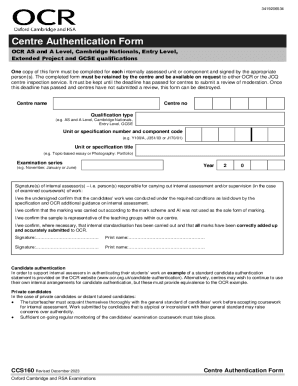
Filling out the UK Oxford Cambridge And RSA CCS160 Centre Authentication Form is an essential process for ensuring the integrity of internally assessed units and components. This guide provides clear, step-by-step instructions to assist users in completing the form accurately and efficiently.
Follow the steps to complete the CCS160 form online.
- Click ‘Get Form’ button to obtain the CCS160 form and open it for completion.
- Enter the centre name in the designated field at the top of the form. This should be the official name of the educational institution.
- Fill in the centre number, which is typically assigned by the qualification authority. Ensure this number is accurate to avoid any delays.
- Specify the qualification type, selecting from options such as AS and A Level, Cambridge Nationals, Entry Level, or GCSE. This categorization is necessary for record-keeping.
- Input the unit or specification number and component code in the appropriate fields. For example, use formats like Y100/A, J351/03, or J170/01.
- Complete the unit or specification title section with the relevant title, such as 'Topic-based essay' or 'Photography: Portfolio'. This ensures clarity in the submitted work.
- Indicate the examination series by selecting options like November, January, or June, which correspond to the assessment schedules.
- Provide the year of the examination series. Typically, this is indicated as a two-digit number, for example, '23' for 2023.
- Internal assessors should sign in the designated area, confirming they have conducted assessments according to required guidelines. Two signatures may be required depending on the number of assessors.
- Print names of the internal assessors who signed the form. This provides transparency and accountability for the assessment process.
- If additional space is needed, continue on a separate sheet as indicated. Ensure that all supplementary pages are securely attached.
- Review the completed form for accuracy and completeness before submission. Upon verification, users can save changes, download, print, or share the form as needed.
Complete your forms online today to ensure compliance with examination requirements.
Industry-leading security and compliance
US Legal Forms protects your data by complying with industry-specific security standards.
-
In businnes since 199725+ years providing professional legal documents.
-
Accredited businessGuarantees that a business meets BBB accreditation standards in the US and Canada.
-
Secured by BraintreeValidated Level 1 PCI DSS compliant payment gateway that accepts most major credit and debit card brands from across the globe.