Loading
Get Wi Oci 21-040/oci 21-200 2018-2026
How it works
-

Open form follow the instructions
-

Easily sign the form with your finger
-

Send filled & signed form or save
How to fill out the WI OCI 21-040/OCI 21-200 online
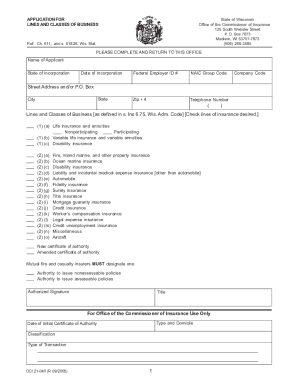
The WI OCI 21-040 and OCI 21-200 forms are essential documents used for applying for lines and classes of business in the state of Wisconsin. This guide provides detailed, step-by-step instructions to help users complete these forms online accurately and efficiently.
Follow the steps to complete your application online.
- Click ‘Get Form’ button to obtain the form and launch it in the available editor.
- Fill in the name of the applicant in the designated field. Ensure that it matches the official business name as registered.
- Provide the state of incorporation and the date of incorporation. These details are crucial for verifying the applicant's legal establishment.
- Enter the federal employer ID number. This number is typically assigned by the IRS and is essential for tax identification.
- Input the NAIC group code, which is important for identifying the insurer within the national system.
- Fill in the complete street address or P.O. Box for correspondence, including the city, state, and zip code.
- Record your telephone number, ensuring that the format is clear and complete for communication purposes.
- Indicate the lines and classes of business you wish to apply for by checking the appropriate boxes, including options like life insurance, disability insurance, and various property insurances.
- If applicable, select whether you are applying for a new certificate of authority or an amended one, as well as any necessary designations for mutual fire and casualty insurers.
- Sign the form in the designated area, ensuring to include the title and date of signing. This verifies the authenticity of your application.
- If required, have the document notarized to ensure legal compliance.
- Review all entries for accuracy and completeness before proceeding.
- Once all sections are filled out, save the changes, and consider downloading, printing, or sharing the form to your records or relevant parties.
Complete your WI OCI 21-040/OCI 21-200 forms online today for a smooth application process.
A. In case of loss of OCI documents, file a complaint with the Police authorities. Apply online for reissue of OCI under lost category through VFS. Please submit physical copy of application along with required documents (including Police Report) to VFS center by Walk-in or Mail.