Loading
Get Ga Water/sewer Account Setup Application - Fulton County 2018
How it works
-

Open form follow the instructions
-

Easily sign the form with your finger
-

Send filled & signed form or save
How to fill out the GA Water/Sewer Account Setup Application - Fulton County online
This guide is designed to assist users in completing the GA Water/Sewer Account Setup Application for Fulton County online. By following the outlined steps, you will be able to fill out the application accurately and efficiently.
Follow the steps to successfully complete your application.
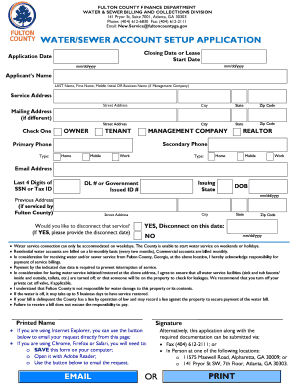
- Click the ‘Get Form’ button to access the GA Water/Sewer Account Setup Application. This will open the form in your editing interface.
- Begin with the application date by entering the date you are submitting the form using the format mm/dd/yyyy. Proceed to fill in the closing date or lease start date similarly.
- In the applicant's name section, clearly write your last name, followed by your first name and middle initial, or the business name if you are a management company.
- Fill in the service address fields with the complete street address, city, state, and zip code where the water and sewer service will be provided.
- If your mailing address differs from the service address, complete the optional mailing address section. Indicate whether you are an owner, tenant, or management company by checking the appropriate box.
- Provide your primary and secondary phone numbers, including the type (home, mobile, or work).
- Enter your email address for further communications. Additionally, provide the last four digits of your Social Security Number or Tax ID and the issuing state.
- If you have a driver's license or government-issued ID, fill in the identification number along with your date of birth in mm/dd/yyyy format.
- If you have previously received service from Fulton County, include your previous address and indicate whether you would like to disconnect that service, providing the date if applicable.
- Read the statements regarding service connections, payment responsibilities, and liability for damages. Acknowledge your understanding by signing and printing your name.
- Save your completed form. You may then choose to download, print, share, or submit it via email, fax, or in person at the designated locations.
Complete your GA Water/Sewer Account Setup Application online today for a smoother service initiation process.
Get form
Experience a faster way to fill out and sign forms on the web. Access the most extensive library of templates available.
Related links form
Get This Form Now!
Use professional pre-built templates to fill in and sign documents online faster. Get access to thousands of forms.