Loading
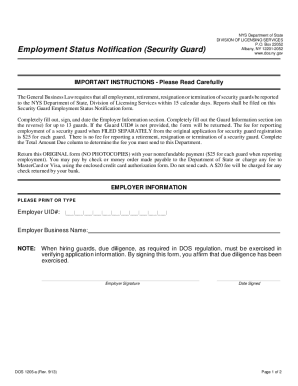
Get Ny Dos-1205-f 2013
How it works
-

Open form follow the instructions
-

Easily sign the form with your finger
-

Send filled & signed form or save
How to fill out the NY DOS-1205-f online
Filling out the NY DOS-1205-f, the Employment Status Notification form for security guards, is essential for reporting employment changes to the NYS Department of State. This guide will provide clear, step-by-step instructions to ensure you complete the form accurately and efficiently.
Follow the steps to complete the form successfully.
- Click ‘Get Form’ button to obtain the form and open it in the editor.
- Next, enter the Employer Business Name. Ensure that the name matches the name registered with the Department of State.
- Affirm due diligence by signing the Employer Signature field. This ensures that you have verified the application information provided for the security guard.
- Enter the Date of Change using the format MM/DD/YYYY.
- Fill in the Guard Name and Social Security # accurately to ensure there are no issues with the submission.
- Review the entire form for accuracy before saving your changes.
- Once all fields are complete, users can choose to save changes, download, print, or share the form as necessary.
Take the first step towards compliance and fill out your forms online today.
Get form
Experience a faster way to fill out and sign forms on the web. Access the most extensive library of templates available.
Get This Form Now!
Use professional pre-built templates to fill in and sign documents online faster. Get access to thousands of forms.