Loading
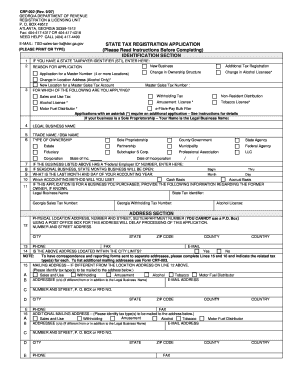
Get State Tax Registration Application ... - Choice Payroll
How it works
-

Open form follow the instructions
-

Easily sign the form with your finger
-

Send filled & signed form or save
How to fill out the STATE TAX REGISTRATION APPLICATION ... - Choice Payroll online
Filling out the State Tax Registration Application is a crucial step for businesses seeking to comply with state tax requirements. This guide provides a clear and detailed approach, ensuring you can complete the application accurately and efficiently.
Follow the steps to complete the application successfully.
- Click ‘Get Form’ button to obtain the form and open it in the editor.
- Identify the 'Identification Section.' Here, if you possess a State Taxpayer Identifier (STI), enter it in the specified field. Provide the reason for your application by selecting one of the options such as 'New Business' or 'Change in Ownership Structure.'
- In the 'Legal Business Name' field, enter the official name under which your business operates. If there is a trade name or 'Doing Business As' (DBA) name, fill this in as well.
- Select the type of ownership from the provided options. Choices include Sole Proprietorship, Partnership, LLC, Corporation, among others.
- If your business has a Federal Employer ID Number, input it in the designated field. Provide the state of incorporation and the date of incorporation as directed.
- Fill in the physical location address accurately, including street number, city, state, and zip code. Note that using a P.O. Box is not acceptable.
- If your correspondence address differs from your physical location, complete the mailing address section, specifying the related tax types.
- In the 'Ownership/Relationship Section,' indicate the owner's title and include their Social Security number as mandated for processing.
- For the 'Sales and Use Tax Section,' provide the nature of your business, detailing any expected sales of taxable items, including alcohol or tobacco.
- Complete the 'Withholding Tax Section' if applicable, indicating the responsible party for payroll taxes and the first date wages will be paid.
- Finally, review the entire application carefully. Sign and date the form to complete your submission.
- Once finalized, you can save changes, download, print, or share the completed form as necessary.
Start filling out your STATE TAX REGISTRATION APPLICATION online today to ensure your business remains compliant.
Utah Withholding Tax Setup Visit Utah Taxpayer Access Point to apply for a withholding tax account online. Registration may take up to 15 days to process. You will receive a 14-character Withholding Tax Account ID (it will look like 12345678-901-WTH) through email and a PIN through physical mail.
Industry-leading security and compliance
US Legal Forms protects your data by complying with industry-specific security standards.
-
In businnes since 199725+ years providing professional legal documents.
-
Accredited businessGuarantees that a business meets BBB accreditation standards in the US and Canada.
-
Secured by BraintreeValidated Level 1 PCI DSS compliant payment gateway that accepts most major credit and debit card brands from across the globe.