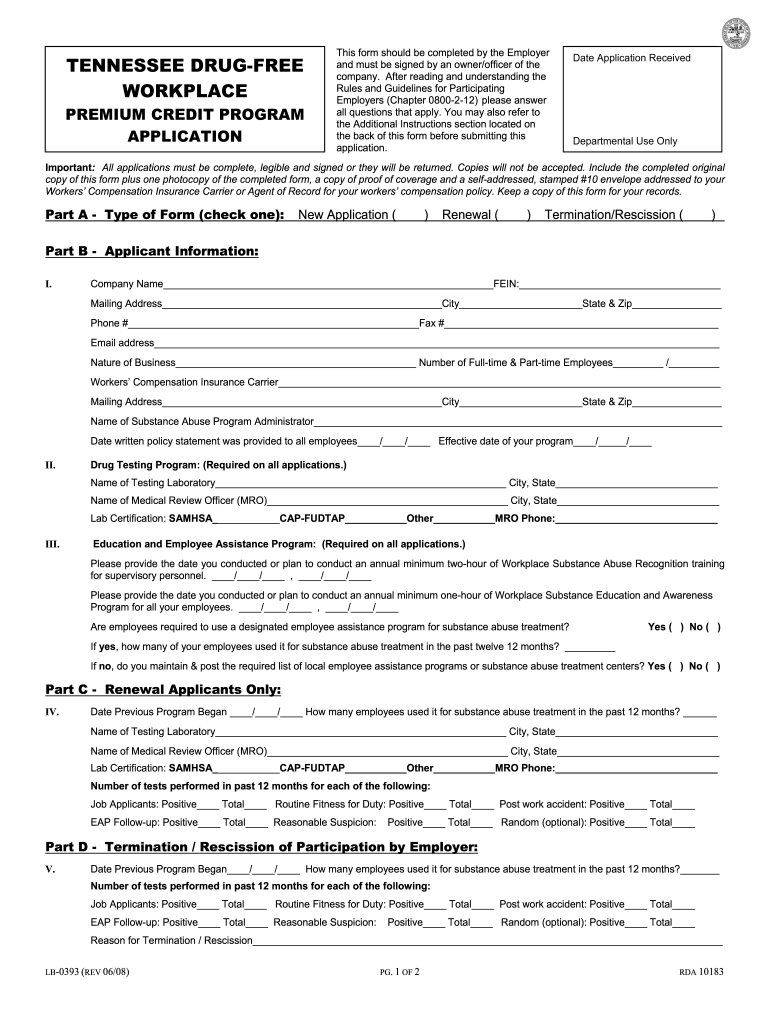
Y an owner/officer of the company. After reading and understanding the Rules and Guidelines for Participating Employers (Chapter 0800-2-12) please answer all questions that apply. You may also refer to the Additional Instructions section located on the back of this form before submitting this application. Date Application Received Departmental Use Only Important: All applications must be complete, legible and signed or they will be returned. Copies will not be accepted. Include the completed .
Loading

Open form follow the instructions

Easily sign the form with your finger

Send filled & signed form or save
How to fill out the TN LB-0393 online
The TN LB-0393 form is a crucial document for employers participating in the Tennessee Drug-Free Workplace Program. This guide will help you navigate through the process of completing the form online, ensuring that all necessary information is accurately captured.
Follow the steps to successfully complete the form online.
- Click the ‘Get Form’ button to obtain the form and open it in the editor.
- Begin with Part A by selecting the type of application you are submitting. Choose either 'New Application,' 'Renewal,' or 'Termination/Rescission' by checking the appropriate box.
- In Part B, enter the applicant information, including the company name, FEIN, mailing address, and contact information. Make sure to provide accurate details regarding the nature of your business and the number of full-time and part-time employees.
- Complete the section for your workers' compensation insurance carrier, providing all relevant mailing address information and the name of your substance abuse program administrator.
- Then, fill in the dates for your drug testing program, including the name of the testing laboratory and the medical review officer (MRO). Specify the lab certifications and provide the MRO's contact number.
- Proceed to the education and employee assistance program section. Here, you will need to indicate the dates for your annual training sessions for both supervisory personnel and all employees, as well as state whether employees are required to use a designated assistance program.
- If you are a renewal applicant, complete Part C by indicating the previous program's start date and providing data on how many employees utilized the program for substance abuse treatment in the past year.
- If applicable, for termination applications, complete Part D with similar details as in Part C, and provide the reason for termination as requested.
- Review all information for completeness and clarity. It is crucial to ensure all information is legible and all required fields are filled out correctly.
- After verification, sign and date the application in the Employer Certification section, and ensure all necessary attachments (proof of coverage and self-addressed envelope) are included.
- Save your completed form, and then download or print it for submission. Make sure to keep a copy for your records.
Complete your TN LB-0393 form online today to ensure your compliance with the Tennessee Drug-Free Workplace Program.
Experience a faster way to fill out and sign forms on the web. Access the most extensive library of templates available.
Related content
... Tennessee Department of Labor. A. Tennessee Drug-Free Workplace Application Form, (...
Get answers to your most pressing questions about US Legal Forms API.
What is the difference between EIN and employer account number?
The Employer Identification Number (EIN) is a federal tax identification number assigned by the IRS, while the employer account number is specific to the state of Tennessee and is used for state tax purposes. Essentially, the EIN is for federal tax reporting, and the employer account number handles state unemployment taxes. Understanding these differences is crucial for effective tax management in compliance with regulations. For clarity, resources provided by USLegalForms can be beneficial.
How to get TNpaws access code?
To acquire a TNpaws access code, register for an account on the Tennessee Department of Labor’s website. During the registration, you must provide certain business information, which will help in obtaining your access code. Once you have the code, you can utilize TNpaws for a range of employer services efficiently. If you encounter any issues, consider using USLegalForms for additional support.
How do I get a TN employer account number?
To obtain a TN employer account number, you must register your business with the Tennessee Department of Labor and Workforce Development. During the registration process, you'll provide necessary business details, and the department will assign you an account number. You can submit your registration online or by mail, but ensure that all information is accurate to avoid delays. Resources from USLegalForms can streamline your registration experience.
How do I find my Tennessee employer account number?
To find your Tennessee employer account number, check the confirmation documents you received when you registered your business with the Tennessee Department of Labor. Alternatively, you can contact their office directly, and they can provide it to you after confirming your identity and the details of your business. Maintaining organized records is vital as this number is essential for tax filings and compliance related to TN LB-0393.
How do I get an employer tax ID number?
Getting an employer tax ID number requires you to apply for an Employer Identification Number (EIN) through the IRS. This application can be completed online, and you will need to provide information about your business structure. Once assigned, this number will be essential for reporting wages and taxes. If you need assistance navigating this process, consider consulting with USLegalForms for expert guidance.
How do I register as an employer in TN?
To register as an employer in Tennessee, you need to complete the registration form available on the Tennessee Department of Labor and Workforce Development website. You will need to provide information about your business, including its structure and contact details. After you submit the registration form, you’ll receive your employer identification number, which is crucial for tax purposes. The TN LB-0393 can be useful in guiding you through the registration process smoothly.
Is a termination letter required in Tennessee?
In Tennessee, a termination letter is generally required when a business dissolves or ceases operation. This document informs the state and other parties of the business's closure. Using TN LB-0393, you can find templates and guidelines that assist you in creating an effective termination letter to fulfill this requirement efficiently.
What is franchise extension?
A franchise extension is a request to delay the payment of franchise and excise taxes. This extension allows businesses additional time to prepare their filings without incurring penalties. By using TN LB-0393, you can gain a better understanding of what a franchise extension entails and how to apply for one through the proper channels.
Does TN accept federal extension for S corporations?
Yes, Tennessee does accept federal extensions for S corporations, provided you meet certain conditions. It's essential to ensure that your federal application complies with Tennessee's filing requirements. With TN LB-0393, you can find resources that help you navigate this process correctly and keep your business compliant.
How to file for extension on franchise and excise tax in Tennessee?
To file for an extension on franchise and excise tax in Tennessee, you must fill out Form FAE 170, which is available directly from the Tennessee Department of Revenue. You can also submit an extension online through the department's website. Utilizing TN LB-0393 can streamline this process and help you maintain compliance with state regulations.
Use professional pre-built templates to fill in and sign documents online faster. Get access to thousands of forms.
If you believe that this page should be taken down, please follow our DMCA take down process here.
This form is available in several versions. Select the version you need from the drop-down list below.