Loading
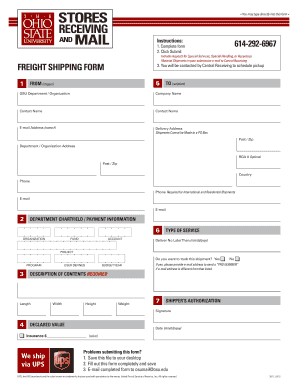
Get 614-292-6967 Freight Shipping Form - Receiving And Mail Services - Receivingandmail Osu
How it works
-

Open form follow the instructions
-

Easily sign the form with your finger
-

Send filled & signed form or save
How to fill out the 614-292-6967 Freight Shipping Form - Receiving And Mail Services - Receivingandmail Osu online
The 614-292-6967 Freight Shipping Form is essential for sending shipments through Ohio State University's receiving and mail services. This guide provides clear, detailed instructions on each section of the form to ensure a smooth submission process.
Follow the steps to completely and accurately fill out the freight shipping form.
- Press the ‘Get Form’ button to access the freight shipping form and open it for completion.
- Begin by filling in the 'From' section. Provide the name of the shipper, the OSU department or organization, the contact name, and their email address. Ensure that the delivery address is clear and includes the correct postal code, keeping in mind that shipments cannot be sent to a P.O. Box.
- Next, complete the 'Department Chartfield / Payment Information' section. Input the organization, fund, account, type of service, and any necessary tracking options. Specify if you need the shipment delivered by a particular date.
- In the 'User Defined' section, provide a description of the contents of the shipment, including length, width, height, and weight.
- Navigate to the 'Shipper’s Authorization' section where you will need to provide your signature and the date. If you desire insurance, specify the declared value and complete the related field.
- If you are experiencing problems submitting the form, save the file to your desktop once completed. Ensure all fields are filled accurately, then email the finalized form to osumail@osu.edu for processing.
- After submission, await contact from Central Receiving to schedule the pickup of your shipment.
Complete the 614-292-6967 Freight Shipping Form online today to ensure your shipment is processed smoothly.
How to check BuckeyeMail. Once you've activated your username and created a password, log into BuckeyeMail at buckeyemail.osu.edu.
Industry-leading security and compliance
US Legal Forms protects your data by complying with industry-specific security standards.
-
In businnes since 199725+ years providing professional legal documents.
-
Accredited businessGuarantees that a business meets BBB accreditation standards in the US and Canada.
-
Secured by BraintreeValidated Level 1 PCI DSS compliant payment gateway that accepts most major credit and debit card brands from across the globe.