Loading
Form preview
  • US Legal Forms
  • Other Templates
  • Other Forms
  • South Carolina Other Forms
  • Sc Home Occupation Application - Bluffton Town

Get Sc Home Occupation Application - Bluffton Town

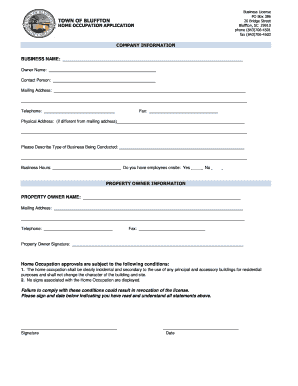
Business License PO Box 386 20 Bridge Street Bluffton, SC 29910 phone (843)7064501 fax (843)7064503TOWN OF BLUFFTONHOME OCCUPATION APPLICATIONCOMPANY INFORMATION BUSINESS NAME: Owner Name: Contact.

How it works

  1. Open form

    Open form follow the instructions

  2. Easily sign form

    Easily sign the form with your finger

  3. Share form

    Send filled & signed form or save

How to fill out the SC Home Occupation Application - Bluffton Town online

Filing the SC Home Occupation Application in Bluffton Town is a straightforward process that allows users to register their home-based businesses legally. This guide provides clear, step-by-step instructions to help you navigate the online application effectively.

Follow the steps to complete your application accurately.

  1. Click 'Get Form' button to access the application form and open it in the online editor.
  2. Begin by filling in the company information section. Enter your business name, followed by the owner's name and contact person details. Make sure to include a complete mailing address, along with the telephone number and fax number, if applicable.
  3. If your physical address is different from your mailing address, please provide the physical address in the respective fields. Clearly specify the type of business you are conducting and state your business hours. Indicate whether you have any employees on-site by selecting 'Yes' or 'No.'
  4. Next, complete the property owner information section. Provide the property owner's name, their mailing address, and contact details, including telephone and fax numbers if relevant.
  5. Ensure the property owner signs the form in the designated space. This signature is essential to confirm that the property owner acknowledges the application and any associated conditions.
  6. Read and understand the home occupation approval conditions outlined in the application. Make sure you comply with the requirements regarding the nature of your business and signage restrictions.
  7. Finally, sign and date the form where indicated. Once you have completed the application, review all entries for accuracy and completeness before proceeding.
  8. You can now save your changes, download your application, print it for your records, or share it as needed.

Take action now and complete your SC Home Occupation Application online to ensure compliance with business regulations.

Get form

Experience a faster way to fill out and sign forms on the web. Access the most extensive library of templates available.
Get form

Related content

town of bluffton - home occupation application
TOWN OF BLUFFTON. HOME OCCUPATION APPLICATION. Business License. PO Box 386. 20 Bridge...
Learn more
Chief Building Official - Clemson's Career Center
Bluffton, SC Full-time. Apply Now. Job Summary. The purpose of this ... occupancy of...
Learn more
Voting Systems: How They Work, Vulnerabilities...
Oct 5, 2022 — A guide on how elections are run and how votes are detected and counted.
Learn more

Related links form

University Of Northwestern - St. Paul School Of Nursing Application For Admission 2020 MTSU VSCC 3 + 1 Articulation/Transfer Agreement CSUN Speech Language Pathology Assistant Fieldwork Experience Program AdventHealth 19-FDTN-05016 2019

Questions & Answers

Get answers to your most pressing questions about US Legal Forms API.

Contact support

In South Carolina, you can perform handyman work worth up to $1,000 without a contractor license. This includes minor repairs and maintenance tasks that fall below this threshold. However, it is vital to adhere to the guidelines outlined in the SC Home Occupation Application - Bluffton Town when operating from your residence. Always ensure that your work meets local building codes and safety regulations, as this can vary by area.

In South Carolina, whether you need a license as a handyman depends on the type and extent of work you plan to perform. For small jobs, a license may not be necessary, but larger projects often require a contractor’s license. It is advisable to check the local regulations and apply for the SC Home Occupation Application - Bluffton Town to comply with zoning laws. This ensures that you run your business legally and responsibly.

To register as a handyman in South Carolina, you should first research local requirements for licensing and permits. Completing the SC Home Occupation Application - Bluffton Town is an essential step if you plan to operate from your home. Be sure to gather any necessary documentation, such as proof of residence and identity. You may also want to explore potential business registration options to protect your brand.

Yes, in South Carolina, business licenses typically require renewal on an annual basis. Staying aware of renewal dates will help ensure that your business remains compliant and operational. If you're working on the SC Home Occupation Application - Bluffton Town, it’s essential to keep this renewal requirement in mind for continued success.

For inquiries related to business licenses in Bluffton, you can reach the town's business licensing office directly. Having their contact information at your fingertips can facilitate any questions you might have while processing your SC Home Occupation Application - Bluffton Town.

A business permit is generally required for specific activities regulated by local or state authorities, while a business license grants you the legal ability to operate within a specific jurisdiction. Understanding this distinction can help you when completing your SC Home Occupation Application - Bluffton Town and ensure that you meet all necessary requirements.

Locating your business license number is typically straightforward. You can check your registration documents or contact the local licensing authority. For those navigating the SC Home Occupation Application - Bluffton Town, having your license number handy simplifies the process.

To register a business in South Carolina, you can contact the South Carolina Secretary of State's office. Their customer service line is available for any inquiries about the registration process. Having this information will be critical as you move forward with your SC Home Occupation Application - Bluffton Town.

Bluffton, SC is known for its charming neighborhoods and thriving local economy. The community attracts many affluent residents who appreciate its blend of historical charm and modern amenities. If you're planning to establish a business here, understanding the local clientele can benefit your SC Home Occupation Application - Bluffton Town.

The hourly rate for a handyman in South Carolina typically ranges from $50 to $150, depending on the complexity of the tasks. For those considering a handyman career, it's essential to understand how these rates align with your business strategy and local market demands. As you navigate your SC Home Occupation Application - Bluffton Town, be sure to account for these rates in your financial planning.

Get This Form Now!

Use professional pre-built templates to fill in and sign documents online faster. Get access to thousands of forms.
Get form
If you believe that this page should be taken down, please follow our DMCA take down processhere.
Get SC Home Occupation Application - Bluffton Town
Get form
  • Adoption
  • Bankruptcy
  • Contractors
  • Divorce
  • Home Sales
  • Employment
  • Identity Theft
  • Incorporation
  • Landlord Tenant
  • Living Trust
  • Name Change
  • Personal Planning
  • Small Business
  • Wills & Estates
  • Packages A-Z
  • Affidavits
  • Bankruptcy
  • Bill of Sale
  • Corporate - LLC
  • Divorce
  • Employment
  • Identity Theft
  • Internet Technology
  • Landlord Tenant
  • Living Wills
  • Name Change
  • Power of Attorney
  • Real Estate
  • Small Estates
  • Wills
  • All Forms
  • Forms A-Z
  • Other Templates
  • Legal Hub
  • About Us
  • Help Portal
  • Legal Resources
  • Blog
  • Affiliates
  • Contact Us
  • Delete My Account
  • Site Map
  • Industries
  • Forms in Spanish
  • Localized Forms
  • State-specific Forms
  • Forms Kit
  • Real Estate Handbook
  • All Guides
  • Notarize
  • Incorporation services
  • For Consumers
  • For Small Business
  • For Attorneys
  • USLegal
  • FormsPass
  • pdfFiller
  • signNow
  • altaFlow
  • DocHub
  • Instapage
Form Packages
  • Adoption
  • Bankruptcy
  • Contractors
  • Divorce
  • Home Sales
  • Employment
  • Identity Theft
  • Incorporation
  • Landlord Tenant
  • Living Trust
  • Name Change
  • Personal Planning
  • Small Business
  • Wills & Estates
  • Packages A-Z
Form Categories
  • Affidavits
  • Bankruptcy
  • Bill of Sale
  • Corporate - LLC
  • Divorce
  • Employment
  • Identity Theft
  • Internet Technology
  • Landlord Tenant
  • Living Wills
  • Name Change
  • Power of Attorney
  • Real Estate
  • Small Estates
  • Wills
  • All Forms
  • Forms A-Z
  • Other Templates
Customer Service
  • Legal Hub
  • About Us
  • Help Portal
  • Legal Resources
  • Blog
  • Affiliates
  • Contact Us
  • Delete My Account
  • Site Map
  • Industries
  • Forms in Spanish
  • Localized Forms
  • State-specific Forms
  • Forms Kit
Legal Guides
  • Real Estate Handbook
  • All Guides
Prepared for you
  • Notarize
  • Incorporation services
Our Customers
  • For Consumers
  • For Small Business
  • For Attorneys
Our Sites
  • USLegal
  • FormsPass
  • pdfFiller
  • signNow
  • altaFlow
  • DocHub
  • Instapage
Social Media
Call us now toll free:
+1 833 426 79 33
As seen in:
© Copyright 1999-2026 airSlate Legal Forms, Inc. 17 Station Street, Suite 303, Brookline, MA 02445
  • Your Privacy Choices
  • Terms of Service
  • Privacy Notice
  • Content Takedown Policy
  • Bug Bounty Program