Loading
Form preview
  • US Legal Forms
  • Form Library
  • Other Forms
  • South Carolina Other Forms
  • Sc Cpmsf 2014

Get Sc Cpmsf 2014-2026

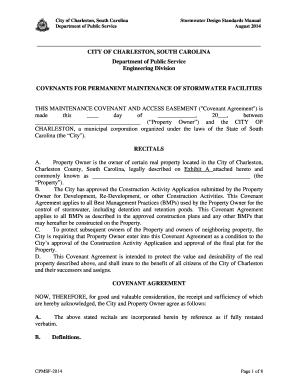
On COVENANTS FOR PERMANENT MAINTENANCE OF STORMWATER FACILITIES THIS MAINTENANCE COVENANT AND ACCESS EASEMENT ("Covenant Agreement") is made this ____ day of _____________, 20___, between ____________________________________ (“Property Owner”) and the CITY OF CHARLESTON, a municipal corporation organized under the laws of the State of South Carolina (the “City"). RECITALS A. Property Owner is the owner of certain real property located in the City of Charleston, Charleston County, South C.

How it works

  1. Open form

    Open form follow the instructions

  2. Easily sign form

    Easily sign the form with your finger

  3. Share form

    Send filled & signed form or save

How to fill out the SC CPMSF online

Filling out the SC CPMSF is an essential step for property owners involved in stormwater management in Charleston, South Carolina. This guide provides clear, step-by-step instructions to help users complete the form accurately and efficiently.

Follow the steps to successfully complete your form

  1. Click the ‘Get Form’ button to access the SC CPMSF online and open it for editing.
  2. Fill in the property owner’s name and details in the designated fields. Ensure all information is current and accurately reflects the ownership of the real property.
  3. Provide the legal description of the property, as outlined in Exhibit A of the Covenant Agreement. This is crucial for proper identification.
  4. Complete the sections regarding the Best Management Practices (BMPs) that will be implemented. Include the names, types, and intended locations of these BMPs.
  5. Document the scheduled maintenance activities as required by the Covenant Agreement, such as routine inspections and maintenance frequency.
  6. Ensure that all entries regarding responsibilities for maintaining BMPs are clear and align with the requirements stated in the manual.
  7. Review the entire document for accuracy. Make sure to include any necessary approvals, signatures, and notary sections as outlined.
  8. After completing the form, save your changes. You can also download or print the completed document for your records or future submission.

Complete your documentation process online to ensure compliance and effective stormwater management.

Get form

Experience a faster way to fill out and sign forms on the web. Access the most extensive library of templates available.
Get form

Related content

City of Charleston, South Carolina Stormwater...
Definitions. CPMSF-2014. Page 1 of 8. Page 2. City of Charleston, South Carolina...
Learn more
Strategies for Improving and Sustaining Real...
by OT Anene · 2019 · Cited by 5 — success factors (CPMSF) for sustainable social...
Learn more

Related links form

University Of Iowa Law Supplemental Clinic Registration Information 2020 CCC Board Of Governors Fee Waiver Application 2017 UVU Work Study Employer Information Form 2018 Radford University Occupational Therapy Assistant Program Application Packet 2019

Questions & Answers

Get answers to your most pressing questions about US Legal Forms API.

Contact support

Indeed, amended returns can be filed electronically, which is particularly advantageous when dealing with SC CPMSF. This method streamlines the process, reduces the chances of errors, and speeds up processing times. To help you navigate the e-filing rules and procedures, uslegalforms offers resources and templates tailored for this purpose.

In South Carolina, any partnership that conducts business or generates income within the state must file a partnership return. Adhering to SC CPMSF ensures that you understand your obligations and avoid potential penalties. It’s essential to include all partners in your filing. Platforms like uslegalforms provide the necessary documents and resources to facilitate this process effectively.

Yes, you can file the IL 1040X electronically, provided you meet the eligibility criteria set forth by the state. Since many taxpayers are now using methods aligned with SC CPMSF, e-filing has become a popular choice for amending returns. It's advisable to confirm that your software supports this feature. For added convenience, consider using uslegalforms as a trusted platform to guide you through the e-filing process.

Typically, amended returns for the past three years can be e-filed under the SC CPMSF guidelines. This offers taxpayers the flexibility to correct their returns for recent years efficiently. To ensure compliance, always check the specific requirements of the state's tax authority. Leveraging uslegalforms can help clarify these details and assist you in completing your e-filing seamlessly.

To file for workers compensation in South Carolina, you must complete the necessary forms and submit them to the appropriate state agency. It's essential to adhere to SC CPMSF to ensure all requirements are met. You’ll want to gather relevant documentation regarding your employment and injury. Utilizing uslegalforms can simplify this process greatly by providing you with user-friendly templates and guidance.

Yes, a South Carolina amended return can indeed be filed electronically. This option is available for those utilizing the SC CPMSF procedures effectively. E-filing not only expedites the process but also enhances accuracy. By choosing a reliable e-filing platform, such as uslegalforms, you can avoid common pitfalls associated with paper filings.

Amended returns can be completed manually or electronically, depending on your preference. However, when handling SC CPMSF, many users find it more efficient to use electronic methods. This approach helps minimize errors and saves time overall. Using platforms like uslegalforms can streamline the process, ensuring that your amendments meet all requirements.

Getting South Carolina identification involves visiting your local Department of Motor Vehicles (DMV) office. Bring the required documents, including proof of identity and residence. The staff at the DMV will guide you through the application process. For more detailed information about requirements and procedures, the SC CPMSF can be an invaluable tool in your journey towards obtaining that ID.

To obtain a South Carolina ID, you generally need a valid birth certificate or a passport, proof of residence, and your Social Security card. Depending on your situation, additional documentation may be required. The SC CPMSF resource can help you check the latest requirements and ensure you have everything you need for a smooth application process.

To get licensed in South Carolina, begin by completing the necessary educational requirements for your specific profession. After that, you must pass the relevant examination. Once you achieve your passing score, submit your application along with the required fees. Utilizing the SC CPMSF platform can provide guidance on documentation and streamline your application process.

Get This Form Now!

Use professional pre-built templates to fill in and sign documents online faster. Get access to thousands of forms.
Get form
If you believe that this page should be taken down, please follow our DMCA take down processhere.

Industry-leading security and compliance

US Legal Forms protects your data by complying with industry-specific security standards.
  • In businnes since 1997
    25+ years providing professional legal documents.
  • Accredited business
    Guarantees that a business meets BBB accreditation standards in the US and Canada.
  • Secured by Braintree
    Validated Level 1 PCI DSS compliant payment gateway that accepts most major credit and debit card brands from across the globe.
Get SC CPMSF
Get form
  • Adoption
  • Bankruptcy
  • Contractors
  • Divorce
  • Home Sales
  • Employment
  • Identity Theft
  • Incorporation
  • Landlord Tenant
  • Living Trust
  • Name Change
  • Personal Planning
  • Small Business
  • Wills & Estates
  • Packages A-Z
  • Affidavits
  • Bankruptcy
  • Bill of Sale
  • Corporate - LLC
  • Divorce
  • Employment
  • Identity Theft
  • Internet Technology
  • Landlord Tenant
  • Living Wills
  • Name Change
  • Power of Attorney
  • Real Estate
  • Small Estates
  • Wills
  • All Forms
  • Forms A-Z
  • Form Library
  • Legal Hub
  • About Us
  • Help Portal
  • Legal Resources
  • Blog
  • Affiliates
  • Contact Us
  • Delete My Account
  • Site Map
  • Industries
  • Forms in Spanish
  • Localized Forms
  • State-specific Forms
  • Forms Kit
  • Real Estate Handbook
  • All Guides
  • Notarize
  • Incorporation services
  • For Consumers
  • For Small Business
  • For Attorneys
  • USLegal
  • FormsPass
  • pdfFiller
  • signNow
  • altaFlow
  • DocHub
  • Instapage
Form Packages
  • Adoption
  • Bankruptcy
  • Contractors
  • Divorce
  • Home Sales
  • Employment
  • Identity Theft
  • Incorporation
  • Landlord Tenant
  • Living Trust
  • Name Change
  • Personal Planning
  • Small Business
  • Wills & Estates
  • Packages A-Z
Form Categories
  • Affidavits
  • Bankruptcy
  • Bill of Sale
  • Corporate - LLC
  • Divorce
  • Employment
  • Identity Theft
  • Internet Technology
  • Landlord Tenant
  • Living Wills
  • Name Change
  • Power of Attorney
  • Real Estate
  • Small Estates
  • Wills
  • All Forms
  • Forms A-Z
  • Form Library
Customer Service
  • Legal Hub
  • About Us
  • Help Portal
  • Legal Resources
  • Blog
  • Affiliates
  • Contact Us
  • Delete My Account
  • Site Map
  • Industries
  • Forms in Spanish
  • Localized Forms
  • State-specific Forms
  • Forms Kit
Legal Guides
  • Real Estate Handbook
  • All Guides
Prepared for you
  • Notarize
  • Incorporation services
Our Customers
  • For Consumers
  • For Small Business
  • For Attorneys
Our Sites
  • USLegal
  • FormsPass
  • pdfFiller
  • signNow
  • altaFlow
  • DocHub
  • Instapage
Social Media
Call us now toll free:
+1 833 426 79 33
As seen in:
© Copyright 1999-2026 airSlate Legal Forms, Inc. 3720 Flowood Dr, Flowood, Mississippi 39232
  • Your Privacy Choices
  • Terms of Service
  • Privacy Notice
  • Content Takedown Policy
  • Bug Bounty Program