Loading
Get Saucon Valley School District Svsd Ipad Insurance
How it works
-

Open form follow the instructions
-

Easily sign the form with your finger
-

Send filled & signed form or save
How to fill out the Saucon Valley School District SVSD iPad Insurance online
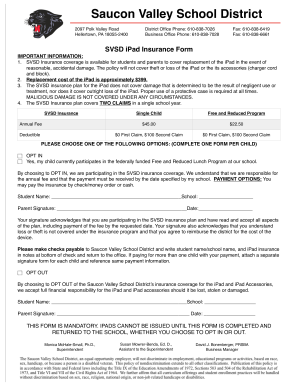
Completing the Saucon Valley School District SVSD iPad Insurance form is an essential step for ensuring coverage for your iPad. This guide provides clear instructions on how to fill out the form online, helping you navigate each section with ease.
Follow the steps to successfully complete the iPad insurance form.
- Click the ‘Get Form’ button to obtain the form and open it in the editor.
- Select whether to OPT IN or OPT OUT of the insurance coverage. If you choose to OPT IN, indicate if your child participates in the Free and Reduced Lunch Program.
- Fill in the required fields for student name and school. Make sure to input accurate information as this is essential for processing the insurance.
- Provide your parent or guardian signature and the date in the designated fields, acknowledging your participation in the insurance plan and your understanding of the related terms.
- If opting in, make note of the annual fee required, based on your child's eligibility for the Free and Reduced Program. Ensure you understand the payment options available.
- Consider additional steps if paying for multiple children; attach separate signature forms for each and reference the same payment information.
- Review the completed form thoroughly to confirm all information is accurate before finalizing.
- Save changes, and choose to download, print, or share the completed form as needed.
Complete your SVSD iPad Insurance form online today to ensure your child is covered!
How to buy On your iPhone (go to Settings > General > About and choose Add AppleCare+ Coverage) Online (requires you to verify your serial number and run a remote diagnostic) At an Apple Store (inspection of iPhone and proof of purchase are required)