Loading
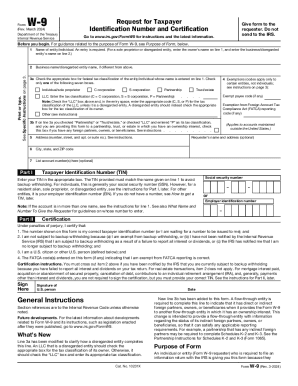
Get Irs W-9 2024-2026
How it works
-

Open form follow the instructions
-

Easily sign the form with your finger
-

Send filled & signed form or save
How to fill out the IRS W-9 online
Filling out the IRS W-9 form online is a straightforward process that requires careful attention to detail. This form is essential for individuals and entities to provide their taxpayer identification number to those who need it for reporting purposes.
Follow the steps to correctly complete the IRS W-9 form online.
- Press the ‘Get Form’ button to download the W-9 form and open it in your preferred editor.
- In line 1, enter your name or the name of the entity as it appears on your tax return. If applicable, enter the business name on line 2.
- On line 3a, check the appropriate box for your federal tax classification. Ensure you check only one box among individual/sole proprietor, C corporation, S corporation, or partnership.
- If you have any exemptions, enter the relevant codes on line 4. Note that this applies to certain entities only.
- Provide your address on line 5, followed by your city, state, and ZIP code on line 6.
- If applicable, list any account numbers on line 7.
- In Part I, enter your Taxpayer Identification Number (TIN) in the appropriate box. For individuals, this typically is your Social Security Number (SSN).
- Complete Part II by certifying that the TIN provided is correct and that you meet the other certification criteria listed.
- Sign and date the form where indicated to complete the certification.
- Finally, save your changes and then download, print, or share the completed form as required.
Now that you have the steps, begin filling out your W-9 online for accurate taxpayer identification.