Loading
Get Ct Cn 100601 2023-2026
How it works
-

Open form follow the instructions
-

Easily sign the form with your finger
-

Send filled & signed form or save
How to fill out the CT CN 100601 online
Filling out the CT CN 100601 form is an important step in securing approval to visit an inmate in Connecticut's correctional facilities. This guide provides clear, step-by-step instructions to help you complete the form accurately and efficiently.
Follow the steps to successfully complete the application.
- Click 'Get Form' button to access the CT CN 100601 form and open it in your preferred editor.
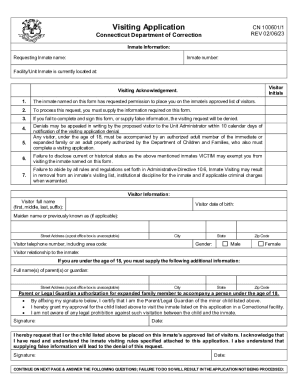
- Begin by filling out the inmate information section, which includes the requesting inmate's name, inmate number, and the facility/unit where the inmate is currently located.
- In the visitor information section, provide your full name (including first, middle, last, and any suffix), date of birth, maiden name (if applicable), street address (note that a post office box is unacceptable), city, state, zip code, and telephone number, including area code.
- Indicate your gender by selecting either 'Male' or 'Female' and describe your relationship to the inmate.
- If you are under 18, fill out the additional information for your parent or legal guardian, including their full names, street address, city, state, and zip code.
- Have your parent or legal guardian provide their signature and date, affirming their authorization for you to visit.
- Continue on the next page and complete any additional questions regarding your criminal history, probation status, prior volunteer or employment status with the DOC, and any special accommodations needed due to a disability.
- Be sure to answer all questions in this section accurately. If applicable, provide explanations for criminal convictions, probation, parole status, and any requests for special accommodations requiring medical documentation.
- Review the completed form thoroughly to ensure all fields are accurately filled out to avoid processing delays or denial.
- Once satisfied with your application, save changes, download a copy for your records, and print the form if necessary. Finally, submit the form in accordance with the specific submission guidelines.
Complete your CT CN 100601 application online today for a smooth visiting process.