Loading
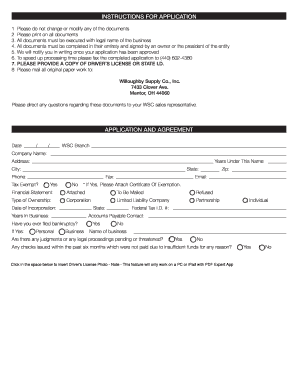
Get Commercial And Residential Account Application (778 Kb Pdf
How it works
-

Open form follow the instructions
-

Easily sign the form with your finger
-

Send filled & signed form or save
How to fill out the Commercial And Residential Account Application (778 Kb PDF online
This guide provides comprehensive, step-by-step instructions to assist you in accurately completing the Commercial And Residential Account Application. Ensuring proper completion of the form will facilitate smoother processing and approval of your application.
Follow the steps to successfully complete your application.
- Click the ‘Get Form’ button to access the application form, which you will then open in your PDF editor.
- Begin by entering the date of your application in the designated field at the top of the form. Include the month, day, and year.
- Fill in your company name, business address, and contact details, including city, state, and zip code. Ensure accuracy as this information is crucial for identification.
- Indicate the number of years your business has been operating under the provided name and enter your phone and fax numbers.
- If your organization is tax-exempt, check 'Yes' and attach a copy of your exemption certificate. Otherwise, select 'No.'
- Complete the financial statement section by indicating whether it is attached, to be mailed, or refused.
- Select the type of business ownership (Corporation, Limited Liability Company, or Partnership) and provide the date of incorporation and state.
- Provide your Federal Tax Identification number and designate a contact person for accounts payable including their details.
- Answer the question regarding any past bankruptcy filings and indicate yes or no, specifying if it was individual or business.
- Answer the inquiry about any judgments or legal proceedings against your business, marking yes or no.
- Indicate whether any checks in the last six months were not honored due to insufficient funds.
- In the 'Owners/Partners/Members/Officers' section, provide details for each member including name, title, social security number, driver’s license number, addresses, and contact information.
- Complete the credit account section, if applicable, including bank references and accounts with other supply companies.
- Review the entire application for accuracy. Ensure each section is fully completed before proceeding.
- Finally, save changes on your document. You can download, print, or share the completed form as needed.
Complete your Commercial And Residential Account Application online today for efficient processing.
Industry-leading security and compliance
US Legal Forms protects your data by complying with industry-specific security standards.
-
In businnes since 199725+ years providing professional legal documents.
-
Accredited businessGuarantees that a business meets BBB accreditation standards in the US and Canada.
-
Secured by BraintreeValidated Level 1 PCI DSS compliant payment gateway that accepts most major credit and debit card brands from across the globe.