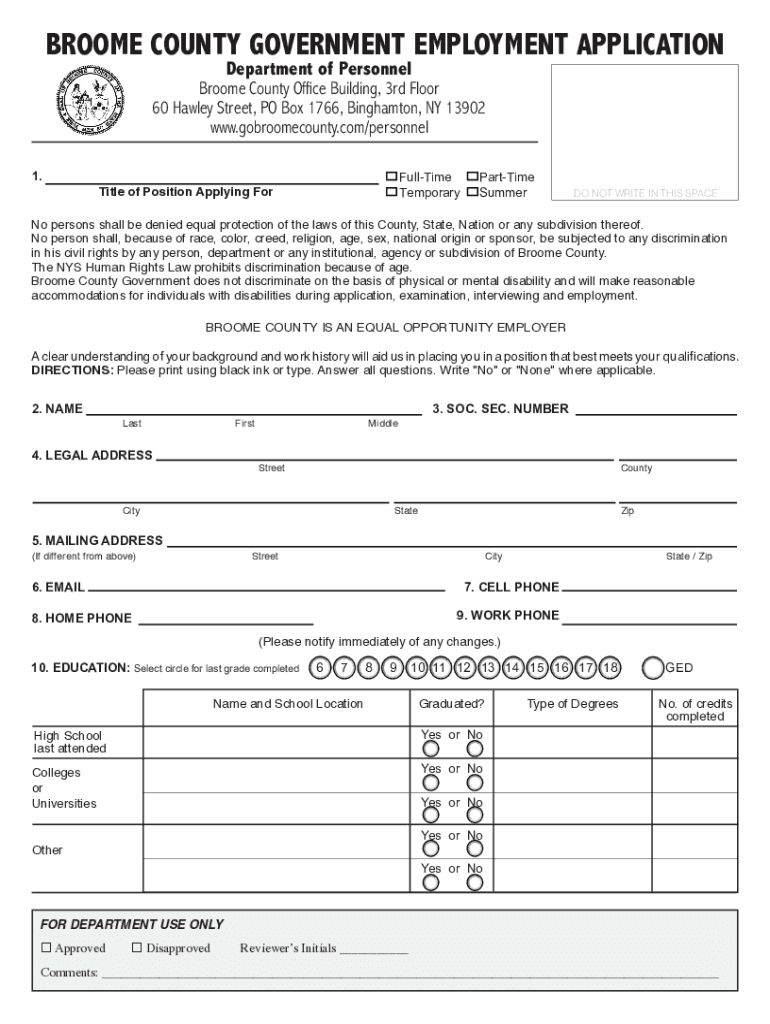
BROOME COUNTY GOVERNMENT EMPLOYMENT APPLICATION Department of Personnel Broome County Office Building, 3rd Floor 60 Hawley Street, PO Box 1766, Binghamton, NY 13902 www.gobroomecounty.com/personnel.
Loading

Open form follow the instructions

Easily sign the form with your finger

Send filled & signed form or save
How to fill out the NY Employment Application - Broome County online
Filling out the NY Employment Application for Broome County can be a straightforward process when you have the right guidance. This guide provides clear, step-by-step instructions to help you complete the form accurately and efficiently.
Follow the steps to successfully complete your application online.
- Click ‘Get Form’ button to access the application and view it in your browser.
- In section 1, indicate the type of position you are applying for by choosing from 'Full-Time', 'Part-Time', 'Temporary', or 'Summer'.
- Fill in your name in section 2, entering your last name, first name, and middle name as appropriate.
- Provide your social security number in section 3 to assist in the processing of your application.
- In section 4, enter your legal address, including street, county, city, state, and zip code.
- Complete section 5 with your mailing address if it differs from your legal address.
- Enter your contact information in sections 6 to 9, including email, cell phone, home phone, and work phone.
- In section 10, provide details about your education by selecting the highest grade completed and naming the schools attended, then indicate if you graduated.
- Section 11 requires you to list your employment history. Start with the most recent job and provide details such as company name, type of business, your position title, and job responsibilities.
- For section 12, confirm if you have the legal right to work in the United States by selecting 'Yes' or 'No'.
- In section 13, disclose any misdemeanor or felony convictions, providing details if necessary.
- If applicable, complete sections 14 and 15 regarding licenses or certificates required for the position.
- Read through the personal data questions in sections 16 to 20 and answer as applicable.
- After completing the form, review all your entries for accuracy.
- Sign the Declaration in section 21 by typing your name or inserting a digital signature and provide the date.
- If you have any additional surnames, print them in section 22.
- Once you have filled out all sections, save your changes, then download, print, or share the completed application as needed.
Get started today by filling out your NY Employment Application for Broome County online!
Experience a faster way to fill out and sign forms on the web. Access the most extensive library of templates available.
Related content
You can apply by mail, in person or Online for Current Vacancies in Broome County...
All claims for application fee waiver are subject to verififcation. Fee waiver forms are...
history record report and may withdraw your application for employment ... 03 Broome...
Get answers to your most pressing questions about US Legal Forms API.
What is the history of Broome County NY?
Broome county was created in 1806 and named for the American Revolutionary leader John Broome. The main economic activities are manufacturing (electronic and electrical equipment), services, and retail trade. Area 707 square miles (1,831 square km).
What is Broome County known for?
Key Aspects. Main Industries: Agriculture and farming. Education: Broome County is home to Binghamton University, one of four university centers in the SUNY system.
How much do Broome County dispatchers make?
Starting salary for an Emergency Services Dispatcher for Broome County is $42,532.26 a year.
What's Binghamton known for?
Known as the "Carousel Capital of the World", Binghamton is home to six antique carousels in its parks. These historic carousels have been lovingly restored and are free and open to the public.
What is the ethnicity of Broome County?
Race & Ethnicity The largest Broome County racial/ethnic groups are White (81.3%) followed by Black (5.0%) and Asian (4.9%).
Who are the largest employers in Broome County NY?
Major employers in Broome County include United Health Services, Lourdes Hospital, Binghamton University, Lockheed-Martin and Universal Instruments.
Use professional pre-built templates to fill in and sign documents online faster. Get access to thousands of forms.
If you believe that this page should be taken down, please follow our DMCA take down process here.