Loading
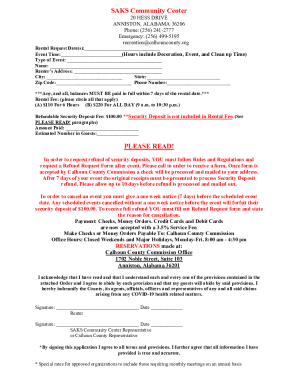
Get Al Saks Community Center Rental Request 2023-2026
How it works
-

Open form follow the instructions
-

Easily sign the form with your finger
-

Send filled & signed form or save
How to fill out the AL SAKS Community Center Rental Request online
This guide provides a clear and supportive approach to completing the AL SAKS Community Center Rental Request online. Follow the instructions carefully to ensure a smooth rental process and compliance with all requirements.
Follow the steps to complete your rental request online:
- Press the ‘Get Form’ button to access the form and open it in the editor.
- Enter the rental request date(s) in the designated field. Ensure that the date format is clear and easily understandable.
- Specify the event time, remembering to include time for decoration, the event itself, and clean-up activities.
- Select the type of event in the provided field. Be specific to help the staff understand your needs.
- Fill in your name and address details completely, including city, state, and zip code.
- Provide a contact phone number where you can be reached.
- Indicate the rental fee by circling the applicable option for either $110 for 6 hours or $220 for all day rental.
- List the refundable security deposit fee of $100, noting that this is separate from the rental fee.
- Enter the amount you will be paying, including any deposits.
- Estimate the number of guests expected for the event.
- Read the rules and regulations carefully before acknowledging your understanding and agreement by providing your signature and the date.
- Ensure that all required signatures are included along with the date of signing. Remember to save changes, download, print, or share the completed form as needed.
Complete your rental request online today to secure your event date!