Coverage other than standard Alberta Health Care Insurance? Gender Yes Does this child Yes No No have Indian or Inuit status? Page of Applicant's Last Name Child's Last Name Date of Birth: Year Social Insurance Number (SIN) Child's First Name Month Day Alberta Personal Health Number Gender Does this child have health coverage other than standard Alberta Health Care Insurance? Yes Does this child Yes No No have Indian or Inuit status? If you have more than two children, pl.
Open form follow the instructions
Easily sign the form with your finger
Send filled & signed form or save
How to fill out the Canada AEHB3931 - Alberta online
Filling out the Canada AEHB3931 - Alberta form is an essential step toward accessing health benefits for eligible individuals and families. This guide provides clear, step-by-step instructions to help you complete the application accurately and efficiently online.
Follow the steps to fill out the Alberta Adult Health Benefit Application
- Press the ‘Get Form’ button to access the Canada AEHB3931 - Alberta form and open it in your editor.
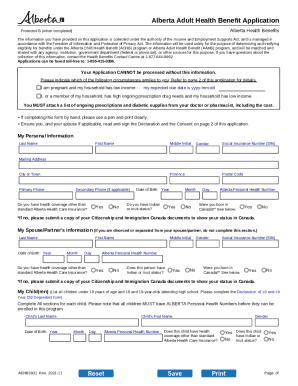
- Provide your personal details in the 'My Personal Information' section. Include your last name, first name, middle initial, gender, social insurance number, mailing address, city or town, province, primary phone number, secondary phone number (if applicable), date of birth, and postal code.
- Indicate if you have any health coverage other than standard Alberta Health Care Insurance by selecting 'Yes' or 'No'.
- If applicable, provide your Alberta Personal Health Number and indicate your Indian or Inuit status.
- Complete the section regarding your spouse or partner's information if applicable. Fill in their last name, first name, middle initial, gender, social insurance number, date of birth, Alberta Personal Health Number, and health coverage status.
- List all children under 18 years of age, including those aged 18-19 who are attending high school. For each child, fill in their last name, first name, date of birth, Alberta Personal Health Number, gender, and health coverage status.
- If you have other health coverage, provide details including the type of coverage, name of the insurer, name of the policyholder, and policy number. Add additional insurers if necessary.
- Read and complete the Declaration and Consent section. Ensure you understand the requirements and consequences of providing false information.
- Sign and date the application. If applicable, have your spouse or partner sign as well.
- Review your completed application for accuracy, then save, download, print, or share it as needed. Submit it via fax or mail as instructed.
Start completing your Canada AEHB3931 - Alberta application online today to access your health benefits!
Experience a faster way to fill out and sign forms on the web. Access the most extensive library of templates available.
Related content
Apr 16, 2018 — We provide this statement in order to allow you to make an informed...
This Online Privacy Statement applies to the information that we collect when you...
Oct 31, 2020 — If you have any questions or concerns about our policy, or our practices...
Get answers to your most pressing questions about US Legal Forms API.
How do I know if my NVC case is complete?
Checking your NVC case status is similar to the USCIS case status check. The National Visa Center Check Status is found within the U.S. Department of State's website and is called the Consular Electronic Application Center (CEAC). You will input your “Visa Application Type” and your Immigrant Visa Case Number.
How do I know if my NVC documents are accepted?
If you received a Welcome Letter from NVC: please visit the Consular Electronic Application Center (CEAC), https://ceac.state.gov/iv, to check the status of cases processing electronically as well as documents needed.
What does it mean when NVC accept documents?
Accepted = NVC has reviewed this document and there are no changes that need to be made. If NVC finds an error on a required document, they will reject the document and tell you what needs to be corrected. They will post their feedback to the right of the document, in the Response Note column.
What happens after NVC accepted all documents?
Submit all of these forms and documents to NVC. WHAT HAPPENS AFTER I SUBMIT MY FORMS AND DOCUMENTS TO NVC? After NVC receives all of the requested paperwork, it will administratively review them. NVC's work is clerical in nature and is meant to ensure you have the documents consular officers need to see.
How do you know that NVC accepted documents?
If NVC determines you have paid the necessary fees, submitted the required immigrant visa application, Affidavit of Support, and supporting documents to NVC, you will receive an email that your case is documentarily complete and NVC will work with the appropriate U.S. Embassy or Consulate to schedule an appointment for ...
How long does it take after NVC accepted documents?
How long does it take to get an appointment? Although NVC strives to schedule appointments within three months of NVC's acceptance of all requested documentation, this timeframe is subject to the operating status and capacity of the consular section.
What happens after DS-260 is approved?
What Happens After I File Form DS-260? After you successfully file Form DS-260, the National Visa Center will send your paperwork to your local U.S. embassy or consulate. The NVC will ask you to schedule an immigrant visa interview at your local U.S. embassy or consulate.
How long does it take to send a case to the Embassy after NVC?
After you have submitted all of your required documentation to the National Visa Center, paid the visa fees, and uploaded all of the necessary documents to your Consular Electronic Application Center (CEAC) portal, it can take anywhere from 3 to 6 months for the National Visa Center to review your documentation and ...
Use professional pre-built templates to fill in and sign documents online faster. Get access to thousands of forms.
If you believe that this page should be taken down, please follow our DMCA take down process here.