Loading
Form preview
  • US Legal Forms
  • Other Templates
  • More Forms
  • More Uncategorized Forms
  • Florida National University Form 020 2018

Get Florida National University Form 020 2018-2026

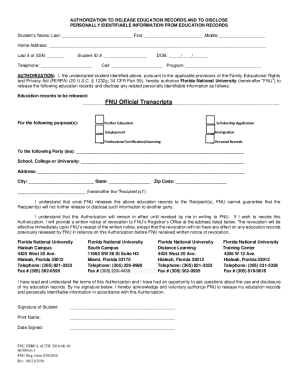
Florida National University - Official Transcripts REQUEST FORM Instructions Please fill out the form completely providing all the information that is asked in this form. Thank you. Date of request Student information Name of student Phone Social Security No XXX- XX- Date of birth Student ID Program Dates of Attendance to Address City State Zip Code Home Phone Work Phone Send to School College or University Purpose of this request Mandatory for S.

How it works

  1. Open form

    Open form follow the instructions

  2. Easily sign form

    Easily sign the form with your finger

  3. Share form

    Send filled & signed form or save

How to fill out the Florida National University Form 020 online

Filling out the Florida National University Form 020 is a straightforward process that allows users to authorize the release of their education records. This guide provides clear and comprehensive steps to help users complete the form accurately and efficiently.

Follow the steps to fill out the Florida National University Form 020.

  1. Click the ‘Get Form’ button to obtain the form and open it for editing.
  2. Begin by entering the student’s last name, followed by the first and middle names in the respective fields.
  3. Fill in the home address, making sure to include all relevant details such as street, city, state, and zip code.
  4. Provide the last four digits of the Social Security Number in the designated box.
  5. Enter the student ID number in the corresponding field.
  6. Fill in the telephone number and date of birth in the required format.
  7. Include a cell phone number if applicable and specify the academic program.
  8. In the authorization section, clearly indicate the education records to be released by checking ‘FNU’.
  9. Select the purpose(s) for which the records are being requested by marking the appropriate boxes.
  10. Identify the recipient(s) by entering the name(s) and other contact details such as address, city, state, and zip code.
  11. Make sure to read the acknowledgment statement carefully and proceed to provide your signature along with the printed name.
  12. Finally, include the date when the form is signed.
  13. Once the form is fully completed, save your changes, and choose to download, print, or share the form as needed.

Complete the Florida National University Form 020 online today to manage your education records effectively.

Get form

Experience a faster way to fill out and sign forms on the web. Access the most extensive library of templates available.
Get form

Related content

SEVIS Names FAQ - Study in the States
Oct 30, 2014 — nonimmigrant and we are no longer to use FNU or LNU? A: ... requesting...
Learn more
Transcript Request | Florida National University
Transcript Request. Requests for original transcripts have to be in writing, using a form...
Learn more
Global warming controversy - zxc.wiki
... articles about him and, despite his request, not removing them from their website....
Learn more

Related links form

Straight Bill Of Lading - Short Form - Original - Rich Doss Inc Sidney Transportation Services Pozas Bros Trking - B/L (Page 1) - Pozas Brothers Trucking! Operating Manual TAYFUN 75Gpdf - Commercial Refrigerators Bb

Questions & Answers

Get answers to your most pressing questions about US Legal Forms API.

Contact support

Any infractions in regard to your financial status with the school, ranging from missed tuition payments, late payments, and even overdue fees or missing equipment that your child signed out but never returned, can result in the school refusing to release her academic records.

Order a Transcript You must have an active GatorLink account to order an official transcript. If you have never had a GatorLink account or cannot remember your password, call the UF Computing Help Desk at 352-392-4357 (392-HELP).

a) Record copy. 1 school year after results posted to student record or 3 school years after results released, whichever is sooner. b) Duplicates. Retain until obsolete, superseded or administrative value is lost.

For information about obtaining public records, please call 850-245-9759 or send an email to PRR@fldoe.org. "Public records" refer to county, state or federal materials that are typically viewable by the public.

You can access your unofficial transcript in the university portal, ONE.UF.edu. We encourage you to review this to ensure all degree and grades are displayed as expected before placing your order for an official transcript.

0:00 0:52 How to Download an Official Transcript - YouTube YouTube Start of suggested clip End of suggested clip And you'll get to a page with a link that says download your transcript. And this is your officialMoreAnd you'll get to a page with a link that says download your transcript. And this is your official internachi transcript for all of your education.

Transcript requests for CLOSED for-profit institutions: Please call 1-888-224-6684 (Toll Free) or visit https://app2.fldoe.org/publicapps/cie/request.asp to complete a transcript request form.

Final Grades & Transcript Enter username and password. Click on Banner Menu icon. Click Banner → Student → Student Records → Academic Transcript. Select transcript level and Unofficial transcript to view grades.

Get This Form Now!

Use professional pre-built templates to fill in and sign documents online faster. Get access to thousands of forms.
Get form
If you believe that this page should be taken down, please follow our DMCA take down processhere.
Get Florida National University Form 020
Get form
  • Adoption
  • Bankruptcy
  • Contractors
  • Divorce
  • Home Sales
  • Employment
  • Identity Theft
  • Incorporation
  • Landlord Tenant
  • Living Trust
  • Name Change
  • Personal Planning
  • Small Business
  • Wills & Estates
  • Packages A-Z
  • Affidavits
  • Bankruptcy
  • Bill of Sale
  • Corporate - LLC
  • Divorce
  • Employment
  • Identity Theft
  • Internet Technology
  • Landlord Tenant
  • Living Wills
  • Name Change
  • Power of Attorney
  • Real Estate
  • Small Estates
  • Wills
  • All Forms
  • Forms A-Z
  • Other Templates
  • Legal Hub
  • About Us
  • Help Portal
  • Legal Resources
  • Blog
  • Affiliates
  • Contact Us
  • Delete My Account
  • Site Map
  • Industries
  • Forms in Spanish
  • Localized Forms
  • State-specific Forms
  • Forms Kit
  • Real Estate Handbook
  • All Guides
  • Notarize
  • Incorporation services
  • For Consumers
  • For Small Business
  • For Attorneys
  • USLegal
  • FormsPass
  • pdfFiller
  • signNow
  • altaFlow
  • DocHub
  • Instapage
Form Packages
  • Adoption
  • Bankruptcy
  • Contractors
  • Divorce
  • Home Sales
  • Employment
  • Identity Theft
  • Incorporation
  • Landlord Tenant
  • Living Trust
  • Name Change
  • Personal Planning
  • Small Business
  • Wills & Estates
  • Packages A-Z
Form Categories
  • Affidavits
  • Bankruptcy
  • Bill of Sale
  • Corporate - LLC
  • Divorce
  • Employment
  • Identity Theft
  • Internet Technology
  • Landlord Tenant
  • Living Wills
  • Name Change
  • Power of Attorney
  • Real Estate
  • Small Estates
  • Wills
  • All Forms
  • Forms A-Z
  • Other Templates
Customer Service
  • Legal Hub
  • About Us
  • Help Portal
  • Legal Resources
  • Blog
  • Affiliates
  • Contact Us
  • Delete My Account
  • Site Map
  • Industries
  • Forms in Spanish
  • Localized Forms
  • State-specific Forms
  • Forms Kit
Legal Guides
  • Real Estate Handbook
  • All Guides
Prepared for you
  • Notarize
  • Incorporation services
Our Customers
  • For Consumers
  • For Small Business
  • For Attorneys
Our Sites
  • USLegal
  • FormsPass
  • pdfFiller
  • signNow
  • altaFlow
  • DocHub
  • Instapage
Social Media
Call us now toll free:
+1 833 426 79 33
As seen in:
© Copyright 1999-2026 airSlate Legal Forms, Inc. 17 Station Street, Ste. 203, Brookline, MA 02445
  • Your Privacy Choices
  • Terms of Service
  • Privacy Notice
  • Content Takedown Policy
  • Bug Bounty Program