Loading
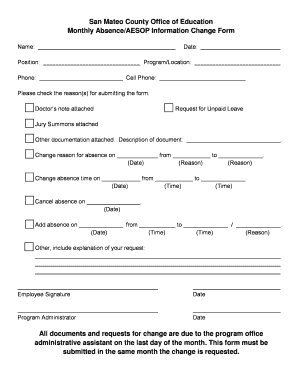
Get Ca Monthly Absence/aesop Information Change Form - San Mateo County 2012-2026
How it works
-

Open form follow the instructions
-

Easily sign the form with your finger
-

Send filled & signed form or save
How to fill out the CA Monthly Absence/AESOP Information Change Form - San Mateo County online
This guide provides clear and supportive instructions for completing the CA Monthly Absence/AESOP Information Change Form for San Mateo County online. Whether you are submitting a request for absence or providing updates, this step-by-step approach will help you navigate the form efficiently.
Follow the steps to complete the form accurately.
- Click the ‘Get Form’ button to access the form and open it in your browser.
- Start by entering the date at the top of the form. Ensure that the date reflects when you are submitting the information.
- Fill in your name, program/location, and position. This information is essential for identifying your request within the system.
- Provide your phone and cell phone numbers to ensure that you can be reached for any follow-up or clarification regarding your request.
- Check the appropriate box next to the reason for submitting the form. Options include attaching a doctor’s note, requesting unpaid leave, jury summons attachment, or other documentation. If selecting ‘Other,’ be sure to provide a description of the document.
- Indicate any changes in absence details, including dates and times. Specify the change reasons in the designated areas for clarity.
- Review the entire form to ensure all necessary information is accurate and complete.
- Once you have filled out the form, save any changes you made. Choose to download, print, or share the form as needed to ensure it is submitted on time.
- Submit the completed form to the program office administrative assistant by the last day of the month. Remember, the form must be submitted for changes requested within the same month.
Complete your documentation online now for a smoother process.