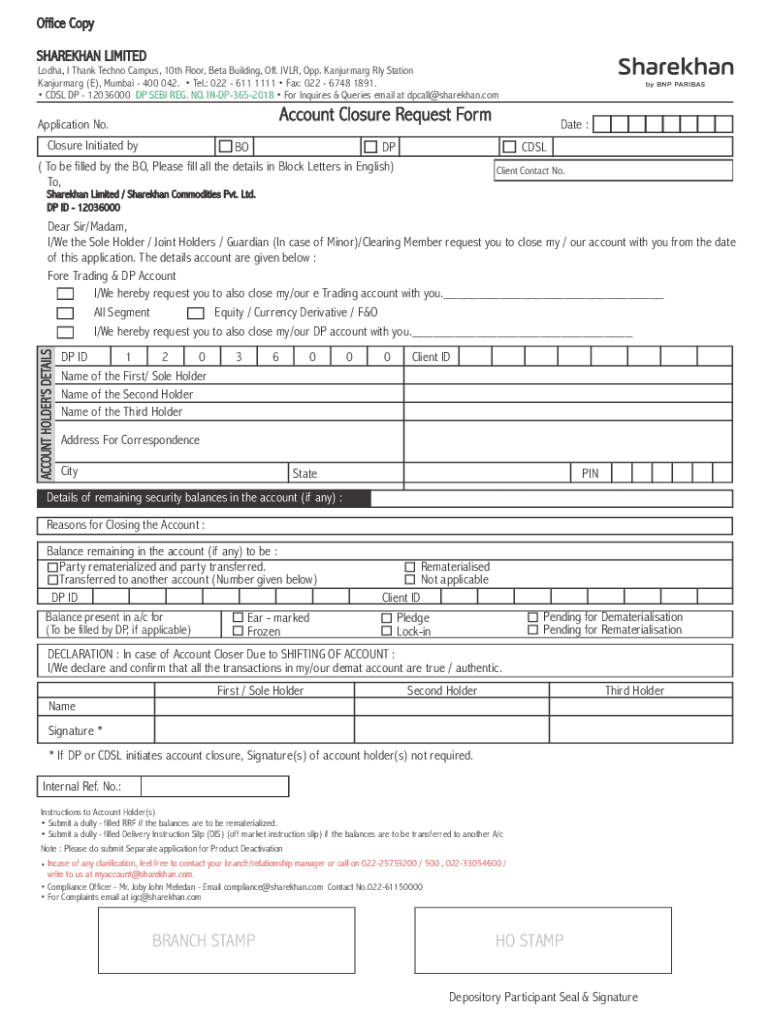
- 6748 1891. CDSL DP - 12036000 DP SEBI REG. NO. IN-DP-365-2018 For Inquires & Queries email at dpcall sharekhan.com Account Closure Request Form Application No. Date : Closure Initiated by BO DP ( To be filled by the BO, Please fill all the details in Block Letters in English) To, CDSL Client Contact No. Sharekhan Limited / Sharekhan Commodities Pvt. Ltd. DP ID - 12036000 ACCOUNT HOLDER S DETAILS Dear Sir/Madam, I/We the Sole Holder / Joint Holders / Guardian (In case of Minor).
Loading

Open form follow the instructions

Easily sign the form with your finger

Send filled & signed form or save
How to fill out the India Sharekhan Account Closure Request Form online
Closing an account with Sharekhan requires careful attention to detail, especially when filling out the Account Closure Request Form. This guide provides clear, step-by-step instructions to help you complete the form online with ease.
Follow the steps to complete the request form accurately.
- Press the ‘Get Form’ button to access the India Sharekhan Account Closure Request Form and open it in your preferred editor.
- Begin by entering your application number and the date of the request.
- Specify whether the account closure is initiated by the BO (Beneficial Owner) or DP (Depository Participant) by filling in the appropriate section.
- In the 'Account Holder’s Details' section, provide all required personal information for each holder. Be sure to fill this out in block letters and in English.
- Indicate the type of accounts you wish to close by selecting options for e Trading and DP accounts.
- List any remaining security balances in your account, and select the appropriate action for those balances, such as rematerialization or transfer to another account.
- Provide the reason for closing the account in the designated field.
- In the 'Declaration' section, ensure all account holders sign the form, unless the closure is initiated by the DP or CDSL.
- After completing the form, review it for accuracy. You can then save the changes, download, print, or share the form as needed.
Complete your India Sharekhan account closure request online today!
Experience a faster way to fill out and sign forms on the web. Access the most extensive library of templates available.
Related content
Identify the previous filing by registration statement number, or the form or ... Under...
After that we were required to convert that appointment into closure. ... Shares once...
the Audited statement of Accounts for the period ended 31st March, 2009. The Report also...
Get answers to your most pressing questions about US Legal Forms API.
Can I close my Sharekhan account online?
Sharekhan account cannot be closed online, over the phone, by online chat or by sending an email. It has to be done by filling the account closure request form (paper-based) and submitting it to Sharekhan. Visit the local Sharekhan branch.
How can I delete my bank account in sharekhan?
The process to change a bank account linked to your Sharekhan trading account cannot happen online. You have to fill out a Client Master Form and submit it with your nearest Sharekhan branch or a sub-broker.
What are the documents required to close Sharekhan account?
You need to submit a physical form. You may visit the nearest Sharekhan branch office to get the account closure form. Alternatively, you can also contact your Sharekhan advisor to avail of the same. After filling the form duly you must attach the unused DIS (Delivery Instruction Slip) to it.
How to fill the account closure form on Sharekhan?
I/We hereby request you to close my/our DP account with you: We undertake to indemnify and reimburse Sharekhan for any losses/cost which the company may incur on account of our transactions and it will be fully binding on my/our heirs/nominees.
How can I close my account in sharekhan?
Steps to deactivate Sharekhan account Visit the local Sharekhan branch. Contact your relationship manager (RM). Request for an account closure form. Fill the form, sign it and attach all the unused DIS slips. Submit the form in the office or courier it to the address mentioned in the form.
How to fill Demat account closure form?
The following details need to be mentioned: DP ID and Client ID. Existing details like name and address – it should match the records. Reason for closing the account. All holders are required to sign the closure request form. POA holder (if any) cannot sign the closure request.
Use professional pre-built templates to fill in and sign documents online faster. Get access to thousands of forms.
If you believe that this page should be taken down, please follow our DMCA take down process here.
This form is available in several versions. Select the version you need from the drop-down list below.