Loading
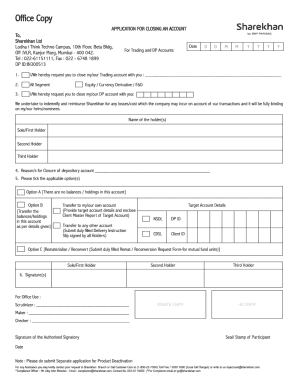
Get India Sharekhan Account Closure Request Form 2017
How it works
-

Open form follow the instructions
-

Easily sign the form with your finger
-

Send filled & signed form or save
How to fill out the India Sharekhan Account Closure Request Form online
Closing your Sharekhan account can be a straightforward process if you understand how to complete the necessary form. This guide provides clear, step-by-step instructions to help you navigate the India Sharekhan Account Closure Request Form online, ensuring that all required information is accurately provided.
Follow the steps to successfully complete the form
- Click ‘Get Form’ button to obtain the form and open it in the editor.
- Begin by entering your personal details. This section typically includes fields for your full name, registered email address, and phone number. Ensure all information is accurate to avoid any processing delays.
- Provide your account details. You will need to enter your Sharekhan account number and any associated details. Double-check this information to confirm it matches your records.
- State the reason for account closure. In this section, you may need to select from predefined options or provide a brief description of your reason. Be clear and concise.
- Review the terms and conditions related to account closure. It is important to read this information carefully to understand any implications or remaining obligations.
- Sign the form electronically. You may need to type your name or use a digital signature, depending on the requirements.
- After filling out all sections of the form, thoroughly review your entries for accuracy. Ensure all required fields are complete before proceeding.
- Finally, save your changes, and choose to download a copy of the form for your records or share it directly if that option is available.
Start completing your documents online today for a seamless experience.
Get form
Experience a faster way to fill out and sign forms on the web. Access the most extensive library of templates available.
Related links form
Sharekhan account cannot be closed online, over the phone, by online chat or by sending an email. It has to be done by filling the account closure request form (paper-based) and submitting it to Sharekhan. Visit the local Sharekhan branch.
Get This Form Now!
Use professional pre-built templates to fill in and sign documents online faster. Get access to thousands of forms.