Loading
Get Oh M140-01-00 61 13-pb 2011-2026
How it works
-

Open form follow the instructions
-

Easily sign the form with your finger
-

Send filled & signed form or save
How to fill out the OH M140-01-00 61 13-PB online
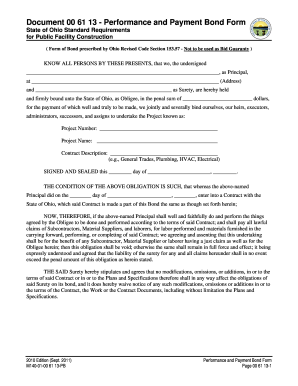
The OH M140-01-00 61 13-PB is a performance and payment bond form used in public facility construction projects in Ohio. This guide will provide clear, step-by-step instructions to help users accurately complete the form online.
Follow the steps to complete the OH M140-01-00 61 13-PB online.
- Click the ‘Get Form’ button to access the form and open it in your web browser.
- In the 'Principal' section, enter the name of the principal party involved and the complete address in the designated fields.
- Input the name of the surety provider in the section labeled 'Surety' and fill in the address associated with the surety.
- Next, specify the penal sum by entering the dollar amount for which the bond is being issued.
- Fill in the 'Project Number' and 'Project Name' corresponding to the construction project.
- In the 'Contract Description' field, provide a brief description of the work type, such as general trades, plumbing, HVAC, or electrical.
- Date the document appropriately by entering the day, month, and year in the specified fields.
- The signatories should sign the form where indicated. The principal must sign and provide their title.
- The surety must also sign the form, with the designated attorney-in-fact providing their signature.
- Complete the 'Surety Information' section by filling out the street address, city, state, zip code, and telephone number of the surety.
- If applicable, fill out the 'Surety Agent's Information' section, entering the agency name and their contact details.
- Once all fields are filled out correctly, review your entries for accuracy; then you can save changes, download, print, or share the completed form.
Start filling out the OH M140-01-00 61 13-PB online today for your public construction project.