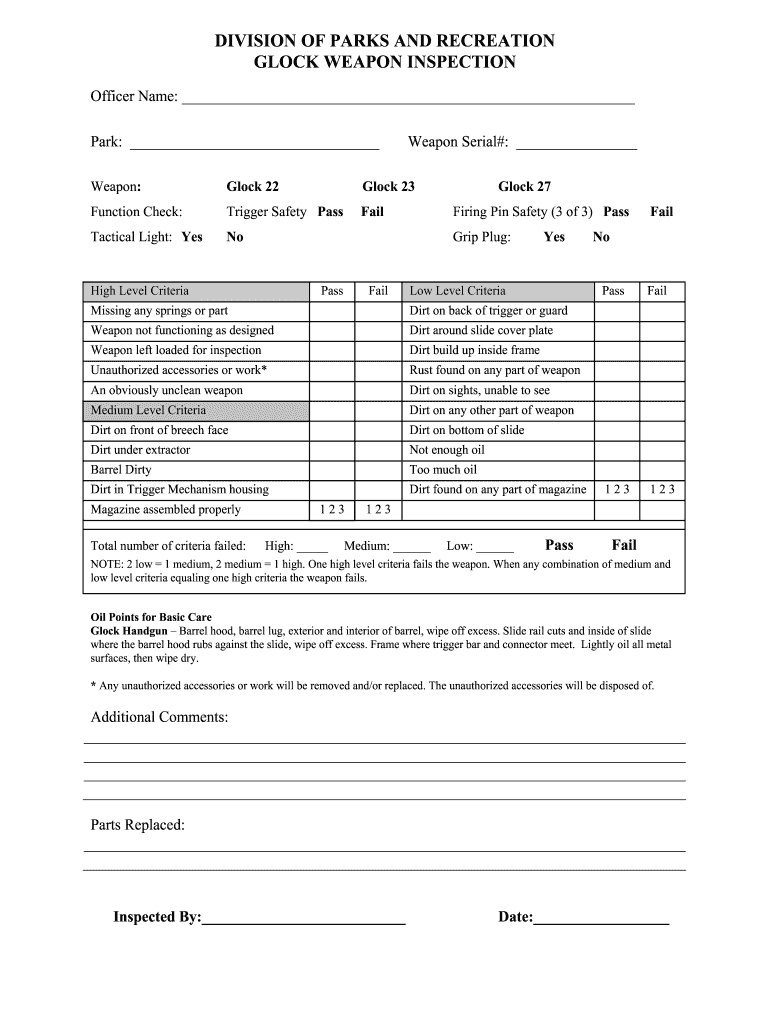
DIVISION OF PARKS AND RECREATION GLOCK WEAPON INSPECTION Officer Name: Park: Weapon: Function Check: Tactical Light: Yes Glock 22 Trigger Safety Pass No Weapon Serial#: Glock 27 Firing Pin Safety.
Loading

Open form follow the instructions

Easily sign the form with your finger

Send filled & signed form or save
How to fill out the OH Glock Weapon Inspection online
The OH Glock Weapon Inspection form is an essential document for ensuring the proper functioning and safety of Glock firearms. This guide will walk you through each step of filling out the form online, providing clear and straightforward instructions tailored to your needs.
Follow the steps to complete the OH Glock Weapon Inspection form online.
- Click ‘Get Form’ button to obtain the form and open it in the designated editor.
- Begin by entering the officer's name in the designated field at the top of the form. Ensure that the name is spelled correctly to avoid any identification issues.
- Identify the park where the inspection is taking place and enter that information in the corresponding section.
- In the weapon serial number field, input the unique serial number of the Glock weapon being inspected.
- Select the specific model of the Glock weapon from the provided options (Glock 22, Glock 23, Glock 27). Ensure that your selection matches the weapon being inspected.
- Conduct a function check on the trigger safety and indicate the results by selecting 'Pass' or 'Fail'.
- Next, specify whether the tactical light is present by choosing 'Yes' or 'No'.
- Proceed to fill out the criteria for the inspection. Mark the corresponding boxes for high level, medium level, and low level criteria based on the condition of the weapon.
- Count the total number of criteria failed and enter those numbers in the appropriate fields for each level (high, medium, low) based on the inspection results.
- In the 'Oil Points for Basic Care' section, review the recommended oiling points if applicable, ensuring proper maintenance following the inspection.
- Add any additional comments regarding the inspection in the provided field if necessary.
- If any parts were replaced during the inspection, list them in the corresponding section.
- In the 'Inspected By' field, enter the name of the person who conducted the inspection and date it accordingly.
- Review all entered information for accuracy. Once satisfied, save changes to retain your work, then choose to download, print, or share the completed form as needed.
Now that you have the complete guide, fill out your OH Glock Weapon Inspection form online with confidence!
Experience a faster way to fill out and sign forms on the web. Access the most extensive library of templates available.
Related content
Mar 30, 2020 — When required or authorized to carry a firearm, sworn personnel shall...
Read chapter 3 Firearms Identification and the Use of Ballistics Evidence: Ballistic...
4 days ago — The pistol most used by American police is the Austrian -made Glock pistol...
Get answers to your most pressing questions about US Legal Forms API.
What part of Glock needs to be registered?
As mentioned earlier, the frame of a GLOCK is the only part that requires registration. Registration is vital for legal ownership and accountability. By ensuring your GLOCK's frame is properly registered during an OH Glock Weapon Inspection, you can avoid potential legal issues. Taking proactive steps now fosters responsible firearm ownership.
Are all Glocks test fired?
Yes, all GLOCKs undergo test firing during manufacturing. This process ensures the firearm functions correctly and meets quality standards. During an OH Glock Weapon Inspection, knowing that your GLOCK has passed test firing can enhance your confidence in its performance. Observing this quality assurance is beneficial for all firearm owners.
What part of a gun needs to be serialized?
The serialized part of a gun is generally the receiver or frame, which houses critical components of the firearm. For GLOCKs, this means focusing on the frame during any OH Glock Weapon Inspection process. Serialization aids in identification and ownership tracking, which is essential for responsible gun ownership. Ensure your firearm complies with these serialization laws.
Can you get a safety for a GLOCK?
Yes, you can install aftermarket safety devices on your GLOCK. While GLOCKs are designed without external safeties, these alternatives can enhance safety measures. Consider consulting an expert during an OH Glock Weapon Inspection to discuss options that suit your needs. Ensuring that your firearm is equipped with additional safety features can add peace of mind.
What part of a Glock has the serial number?
The serial number on a GLOCK is located on the frame of the firearm. This identification number is crucial for tracking and legal compliance. During an OH Glock Weapon Inspection, confirming the presence and visibility of the serial number on the frame helps uphold regulatory standards and confirm the gun's legality. Always ensure that this number is legible and intact.
How long is GLOCK armorer certification?
GLOCK armorer certification typically lasts for three years. This certification ensures that you have the necessary knowledge and skills to inspect, repair, and maintain GLOCK firearms effectively. As part of the process, participants learn about essential aspects of GLOCK operation, which is particularly beneficial during an OH Glock Weapon Inspection. Keeping your skills updated is vital for firearm safety and reliability.
What part of a Glock is regulated?
The part of a GLOCK that is regulated includes the frame and the barrel. Both of these components fall under federal firearm regulations. During an OH Glock Weapon Inspection, verifying the compliance of these parts ensures that your firearm is legally acceptable and safe for use. Understanding these regulations can protect you from legal complications.
What part of a GLOCK has to be registered?
In the United States, the part of a GLOCK that must be registered is the frame. The frame is considered the firearm itself under federal law. During the OH Glock Weapon Inspection, it is crucial to ensure that this component complies with legal regulations. Proper registration helps ensure safe ownership and usage.
Do gun manufacturers test fire every gun?
Some do but most select a sample gun off the line and test fire it. The best manufacturers send you a test target showing you gun's accuracy but that's too much for a large producer like Remington ar Savage on their regular production guns.
Does Glock test their guns?
Extensive tests are done in-house during the product design process as well as externally during purchasing procedures. GLOCK pistols prove that they are reliable under tough and adverse conditions. Advanced manufacturing - GLOCK Perfection glock.com https://eu.glock.com › explore-glock › advanced-manufa... glock.com https://eu.glock.com › explore-glock › advanced-manufa...
Use professional pre-built templates to fill in and sign documents online faster. Get access to thousands of forms.
If you believe that this page should be taken down, please follow our DMCA take down process here.