Loading
Get Shield 65 Plus 2012 Enrollment - Sisc - Sisc Kern
How it works
-

Open form follow the instructions
-

Easily sign the form with your finger
-

Send filled & signed form or save
How to fill out the Shield 65 Plus 2012 Enrollment - SISC - Sisc Kern online
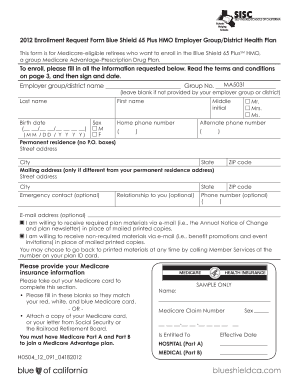
Completing the Shield 65 Plus 2012 Enrollment - SISC - Sisc Kern form is a crucial step for Medicare-eligible retirees wishing to enroll in the Blue Shield 65 Plus HMO plan. This guide will provide comprehensive instructions tailored to users of all backgrounds to facilitate the completion of the form online.
Follow the steps to successfully enroll in the Shield 65 Plus plan.
- Click the ‘Get Form’ button to obtain the enrollment form and open it in your online editor.
- Fill in the employer group or district name and group number, leaving it blank if not provided by your employer. Then, enter your last name, first name, middle initial, and birth date.
- Provide your sex designation and contact numbers, including home and an alternate phone number. Fill in your permanent residence address, making sure to include the street address, city, state, and ZIP code. If your mailing address is different, include that information as well.
- Optionally, list an emergency contact with their relationship to you and contact number. You may also include your email address if you agree to receive plan materials via email.
- Provide your Medicare insurance information. Ensure that this information matches your Medicare card. You can also attach a copy of your card or a letter from Social Security or the Railroad Retirement Board.
- Answer the eligibility questions regarding your status as a retiree, coverage of a spouse or dependents, and any alternative coverage including Medicaid and end-stage renal disease status.
- Select your primary care physician (PCP). Provide their name and ID number, along with the medical group they are affiliated with, confirming if you are already their patient.
- Review the sections regarding the agreement terms. Read through the conditions carefully, and then proceed to provide your signature and date.
- If you are completing the form on behalf of someone else, fill out the necessary authorized representative details, including your name, address, and phone number.
- Submit your completed form either to your Benefits Administrator or by mailing it to the specified Blue Shield address.
Complete your enrollment form online today to secure your health coverage.
The SISC Flex Plan allows active employees to set aside pre-tax dollars to pay for eligible medical and dependent care expenses. With careful planning, the SISC Flex Plan can save you money you would otherwise pay as taxes.
Industry-leading security and compliance
US Legal Forms protects your data by complying with industry-specific security standards.
-
In businnes since 199725+ years providing professional legal documents.
-
Accredited businessGuarantees that a business meets BBB accreditation standards in the US and Canada.
-
Secured by BraintreeValidated Level 1 PCI DSS compliant payment gateway that accepts most major credit and debit card brands from across the globe.