Loading
Get Za Psira 42 Aa 2016
How it works
-

Open form follow the instructions
-

Easily sign the form with your finger
-

Send filled & signed form or save
How to fill out the ZA PSIRA 42 AA online
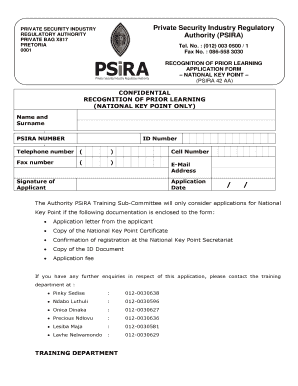
Filling out the ZA PSIRA 42 AA form can be straightforward with the right guidance. This guide will walk you through each section of the form, ensuring you provide all necessary information accurately and efficiently.
Follow the steps to complete your application smoothly.
- Press the 'Get Form' button to access the application form and open it for editing.
- Begin by entering your name and surname in the designated fields. Ensure your information is spelled correctly to avoid any processing delays.
- Input your PSIRA number. If you do not have a PSIRA number, you should obtain one before proceeding.
- Fill in your ID number, ensuring it matches your official identification documents.
- Provide your telephone number and cell number in the respective fields. This allows the authority to contact you if needed.
- Enter your fax number and email address accurately. Make sure both are current to facilitate communication.
- Sign the application as the applicant, confirming that all information provided is correct to the best of your knowledge.
- Date your application appropriately to indicate when you submitted it.
- Prepare and attach the required documentation: application letter, copy of the National Key Point Certificate, confirmation of registration at the National Key Point Secretariat, and a copy of your ID document.
- Make sure to include the application fee as required for processing your application.
- Once all information has been filled out and documents attached, save your changes, and consider downloading or printing a copy for your records before submitting.
Complete your ZA PSIRA 42 AA form online today for a seamless application process.
Get form
Experience a faster way to fill out and sign forms on the web. Access the most extensive library of templates available.
Related links form
How do I get my Psira certificate online? You can simply go on to the Psira website on . psira.co.za , go to publications, scroll down to downloads, choose option for the registration form and select the one you require.
Get This Form Now!
Use professional pre-built templates to fill in and sign documents online faster. Get access to thousands of forms.