Loading
Get Aquinas College Application For Degree Candidacy 2019-2026
How it works
-

Open form follow the instructions
-

Easily sign the form with your finger
-

Send filled & signed form or save
How to fill out the Aquinas College Application For Degree Candidacy online
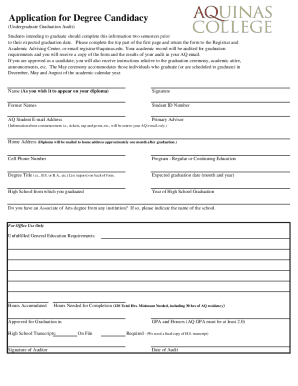
Completing the Aquinas College Application For Degree Candidacy is a crucial step for students intending to graduate. This guide provides clear, step-by-step instructions to help you fill out the form accurately and efficiently.
Follow the steps to complete your application properly.
- Press the ‘Get Form’ button to access the application form and open it in the editor.
- Begin by entering your name as you wish it to appear on your diploma. This is important for ensuring the correct spelling on your graduation certificate.
- Provide your signature in the designated area, signifying your agreement and intention to graduate.
- If you have former names, please list them accurately. This helps in maintaining your academic records.
- Enter your student ID number. This uniquely identifies you within the Aquinas College system.
- Include your AQ student email address, as updates and important information regarding commencement will be sent here.
- Fill in your home address, where your diploma will be mailed approximately one month after graduation.
- Enter your cell phone number for communication purposes during the graduation process.
- Indicate whether you are in a regular program or continuing education program. This helps the office to know your educational pathway.
- List your degree title, e.g., B.S. or B.A., and include your major(s) on the back of the form if applicable.
- Provide your expected graduation date (month and year), which is essential for scheduling the graduation audit.
- Enter the name of the high school from which you graduated and the year of graduation. This information may be used in your graduation audit.
- If applicable, mention if you have an Associate of Arts degree and indicate the name of the institution.
- Review the form for completeness. Ensure all information is accurate before submission.
- Save your changes and download or print the completed form for your records. You may then return it to the Registrar and Academic Advising Center or email it to registrar@aquinas.edu.
Complete your application online today to ensure a smooth path to graduation.