Loading
Form preview
  • US Legal Forms
  • Form Library
  • Other Forms
  • New York Other Forms
  • Ny Hr-07-03 2008

Get Ny Hr-07-03 2008-2026

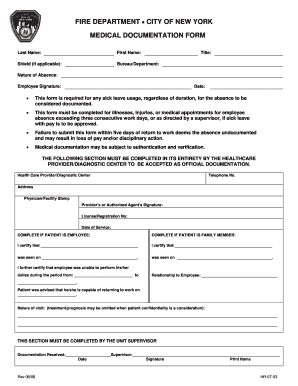
Ent: Nature of Absence: Employee Signature: • • • • Date: This form is required for any sick leave usage, regardless of duration, for the absence to be considered documented. This form must be completed for illnesses, injuries, or medical appointments for employee absence exceeding three consecutive work days, or as directed by a supervisor, if sick leave with pay is to be approved. Failure to submit this form within five days of return to work deems the absence undocumented and may .

How it works

  1. Open form

    Open form follow the instructions

  2. Easily sign form

    Easily sign the form with your finger

  3. Share form

    Send filled & signed form or save

How to fill out the NY HR-07-03 online

The NY HR-07-03 form is essential for documenting sick leave usage for employees of the Fire Department of the City of New York. Properly filling out this form is crucial for ensuring your absence is officially recognized and approved.

Follow the steps to complete the form accurately.

  1. Click ‘Get Form’ button to obtain the form and open it for editing.
  2. Fill in your last name and first name in the designated fields. Ensure that the names are entered correctly to avoid any discrepancies.
  3. If applicable, include your shield number. This is important for identification purposes within the department.
  4. Specify the bureau or department you work in. This information helps in routing the document correctly.
  5. In the 'Nature of Absence' section, clearly describe the reason for your sick leave, whether it is due to illness, injury, or medical appointment.
  6. Sign the form in the Employee Signature field, then write the date when you are completing the form.
  7. Ensure that the healthcare provider or diagnostic center fills out their section in its entirety for the documentation to be accepted officially.
  8. Provide the health care provider's telephone number and address. This information may be necessary for verification purposes.
  9. Obtain the signature and license or registration number of the healthcare provider. This validates the authenticity of the medical documentation.
  10. Complete the section that certifies whether the patient is an employee or a family member, along with their relationship to the employee.
  11. Indicate the dates the employee was unable to perform their duties. This detail is crucial for proper documentation of the absence.
  12. Finally, confirm the nature of the visit, keeping in mind patient confidentiality when describing treatment or prognosis.
  13. In the section completed by the unit supervisor, record that documentation was received, and ensure the supervisor’s signature and printed name are included.
  14. After completing all sections, save changes to the form, and download, print, or share it as required.

Complete your NY HR-07-03 form online to ensure your sick leave is documented properly.

Get form

Experience a faster way to fill out and sign forms on the web. Access the most extensive library of templates available.
Get form

Related content

Cosponsors - H.R.7 - 119th Congress (2025-2026):...
Cosponsors of H.R.7 - 119th Congress (2025-2026): No Taxpayer Funding for Abortion and...
Learn more
My Paycheck | Human Resources
View your paychecks online @ NYS Payroll Online (NYSPO). It may take up to two pay periods...
Learn more
Films Incorporated
Films Incorporated was a 16mm film supplier and home video company based in New York City...
Learn more

Related links form

CA SCVA Individual Membership Form 2019 University Of Arizona Incident Response Plan 2019 Utah State University Official Transcript Order Form 2019 NC Request A Certified Birth Certificate - Wake County 2019

Questions & Answers

Get answers to your most pressing questions about US Legal Forms API.

Contact support

Corporations that conduct business operations within New York City must file a corporation tax return. This applies to both profit and nonprofit organizations, depending on their activities and income levels. Refer to the NY HR-07-03 for specific guidelines on filing requirements and thresholds. Staying informed about these obligations is crucial for maintaining compliance with tax laws.

The New York state employer registration number (ER) identifies your business for tax purposes in New York. This number is required for filing payroll taxes and must be included in various employment-related documents. The NY HR-07-03 guidelines can help you understand the importance of this number and how to acquire it. Maintaining this number ensures compliance and effective communication with state agencies.

To find your employer registration number, check the original documents you received upon registration from the New York State Department of Labor. Alternatively, you can contact their office for assistance if you're unable to locate your number. The NY HR-07-03 information can help you determine the proper channels for obtaining this information. Keeping track of your registration number is key for smooth reporting.

Getting a New York employer registration number involves completing an application through the New York State Department of Labor. You can apply online or submit a paper application based on your preference. Using the NY HR-07-03 resources can simplify this process for you. Having this registration number is crucial for fulfilling your payroll tax responsibilities.

You can obtain a New York state employer registration number by applying through the New York State Department of Taxation and Finance. This can typically be done online or via mail using the appropriate forms. The NY HR-07-03 documentation provides insight on how to navigate this requirement smoothly. This registration number is vital for tax reporting associated with your business.

New employees in New York need to complete several forms, including the W-4 for tax withholding and the NYS-4 for state withholding. Additionally, they may need to fill out other forms related to benefits and employment eligibility. The NY HR-07-03 guidelines can assist employers in providing the necessary documents to new hires efficiently. Ensuring correct paperwork helps avoid future tax issues.

A New York City employee is generally defined as anyone who performs work within the city's limits, regardless of their residence. This includes both full-time and part-time employees, as well as contractors under certain conditions. Under the NY HR-07-03 framework, it is essential to determine employee status correctly for tax purposes. Knowing who qualifies as an employee helps ensure all parties fulfill their tax obligations.

To register for unemployment insurance in New York, visit the New York State Department of Labor's website. You will need to complete specific forms, which can also include wage reporting details. Utilizing the NY HR-07-03 guidance can streamline this registration process for your business. Proper registration is key to comply with state laws and protect your employees.

Individuals who have earned income in New York City must file a return. This requirement includes both residents and non-residents whose income is attributable to work done within the city. Make sure to consult the NY HR-07-03 guidelines for specific income thresholds and applicable exemptions. Filing accurately helps maintain your compliance with city tax laws.

To obtain an Employer Identification Number (EIN) in New York, you can apply online through the IRS website. Completing the application takes only a few minutes, and you can receive your EIN immediately. The NY HR-07-03 resource can help guide you through this process, easing any confusion. Using an EIN is crucial for tax purposes, so it's important to get this step right.

Get This Form Now!

Use professional pre-built templates to fill in and sign documents online faster. Get access to thousands of forms.
Get form
If you believe that this page should be taken down, please follow our DMCA take down processhere.
Get NY HR-07-03
Get form
  • Adoption
  • Bankruptcy
  • Contractors
  • Divorce
  • Home Sales
  • Employment
  • Identity Theft
  • Incorporation
  • Landlord Tenant
  • Living Trust
  • Name Change
  • Personal Planning
  • Small Business
  • Wills & Estates
  • Packages A-Z
  • Affidavits
  • Bankruptcy
  • Bill of Sale
  • Corporate - LLC
  • Divorce
  • Employment
  • Identity Theft
  • Internet Technology
  • Landlord Tenant
  • Living Wills
  • Name Change
  • Power of Attorney
  • Real Estate
  • Small Estates
  • Wills
  • All Forms
  • Forms A-Z
  • Form Library
  • Legal Hub
  • About Us
  • Help Portal
  • Legal Resources
  • Blog
  • Affiliates
  • Contact Us
  • Delete My Account
  • Site Map
  • Industries
  • Forms in Spanish
  • Localized Forms
  • State-specific Forms
  • Forms Kit
  • Real Estate Handbook
  • All Guides
  • Notarize
  • Incorporation services
  • For Consumers
  • For Small Business
  • For Attorneys
  • USLegal
  • FormsPass
  • pdfFiller
  • signNow
  • altaFlow
  • DocHub
  • Instapage
Form Packages
  • Adoption
  • Bankruptcy
  • Contractors
  • Divorce
  • Home Sales
  • Employment
  • Identity Theft
  • Incorporation
  • Landlord Tenant
  • Living Trust
  • Name Change
  • Personal Planning
  • Small Business
  • Wills & Estates
  • Packages A-Z
Form Categories
  • Affidavits
  • Bankruptcy
  • Bill of Sale
  • Corporate - LLC
  • Divorce
  • Employment
  • Identity Theft
  • Internet Technology
  • Landlord Tenant
  • Living Wills
  • Name Change
  • Power of Attorney
  • Real Estate
  • Small Estates
  • Wills
  • All Forms
  • Forms A-Z
  • Form Library
Customer Service
  • Legal Hub
  • About Us
  • Help Portal
  • Legal Resources
  • Blog
  • Affiliates
  • Contact Us
  • Delete My Account
  • Site Map
  • Industries
  • Forms in Spanish
  • Localized Forms
  • State-specific Forms
  • Forms Kit
Legal Guides
  • Real Estate Handbook
  • All Guides
Prepared for you
  • Notarize
  • Incorporation services
Our Customers
  • For Consumers
  • For Small Business
  • For Attorneys
Our Sites
  • USLegal
  • FormsPass
  • pdfFiller
  • signNow
  • altaFlow
  • DocHub
  • Instapage
Social Media
Call us now toll free:
+1 833 426 79 33
As seen in:
© Copyright 1999-2026 airSlate Legal Forms, Inc. 3720 Flowood Dr, Flowood, Mississippi 39232
  • Your Privacy Choices
  • Terms of Service
  • Privacy Notice
  • Content Takedown Policy
  • Bug Bounty Program