Loading
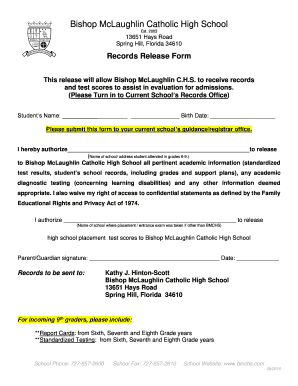
Get Fl Bishop Mclaughlin Catholic High School Student Records Release Authorization 2016-2026
How it works
-

Open form follow the instructions
-

Easily sign the form with your finger
-

Send filled & signed form or save
How to fill out the FL Bishop McLaughlin Catholic High School Student Records Release Authorization online
Filling out the FL Bishop McLaughlin Catholic High School Student Records Release Authorization is an important step in the admissions process. This guide will walk you through each section of the form, ensuring that you provide all necessary information accurately and efficiently.
Follow the steps to complete your authorization form online.
- Click the ‘Get Form’ button to access the Student Records Release Authorization form and open it in the designated online editor.
- Enter the student's name in the designated field, ensuring to include their full name as it appears on official documents.
- Input the student's birth date in the provided space, using the format requested (typically month/day/year).
- In the section requesting the name of the school the student attended in grades 6-9, clearly write the name and address of the relevant school.
- Authorize the release of academic information by signing your name in the parental/guardian signature field. Ensure your signature matches the document identification.
- Record the date on which you are signing the form in the space provided.
- In the field asking for the high school placement test scores, include the name of the school where the test was taken if it was not Bishop McLaughlin.
- Review all the information entered for accuracy before finalizing the document.
- Once completed, save the changes, and you may choose to download, print, or share the form as required.
Take action now and complete your Student Records Release Authorization form online to facilitate the admissions process.