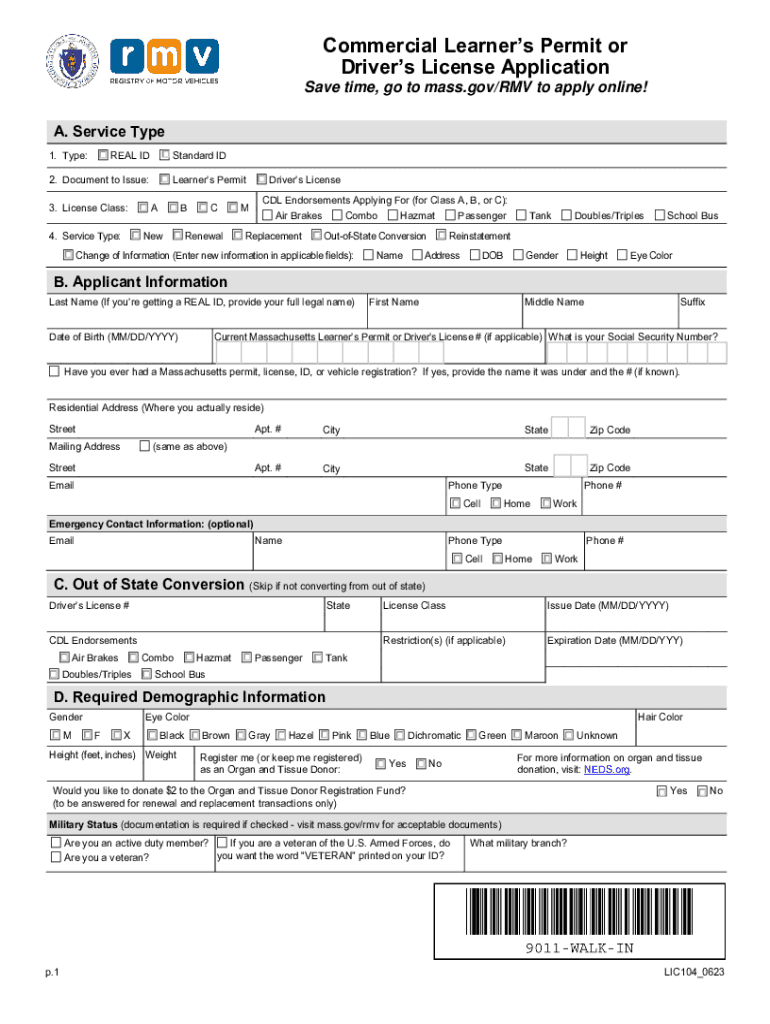
Commercial Learners Permit or Drivers License ApplicationSave time, go to mass.gov/RMV to apply online! A. Service Type 1. Type: REAL ID Standard ID 2. Document to Issue: Learners Permit Drivers.

Open form follow the instructions

Easily sign the form with your finger

Send filled & signed form or save
How to fill out the MA LIC104 online
Filling out the MA LIC104 form online is an essential step for obtaining a Commercial Learner’s Permit or Driver’s License in Massachusetts. This guide will provide you with clear, step-by-step instructions to help you navigate each section of the form with ease.
Follow the steps to successfully complete the MA LIC104 form online.
- Click ‘Get Form’ button to obtain the form and open it in the editor.
- In Section A, select the type of ID you require, choosing between REAL ID or Standard ID. Then, indicate whether you are applying for a Learner’s Permit or Driver’s License, and specify your License Class (A, B, C, or M) if applicable.
- For CDL Endorsements in Section A, check any endorsements you are applying for such as Air Brakes or Hazmat, and choose your intended service type (New, Renewal, Replacement, Out-of-State Conversion, Reinstatement, or Change of Information).
- Move to Section B to provide your applicant information, including your last name, date of birth, first name, middle name, and suffix. If you have a Massachusetts permit or license, include that number.
- Fill in your residential and mailing address details in Section B. If your mailing address is the same as your residential address, you may check the appropriate box.
- Section C should be filled out only if you are converting from an out-of-state license; include information such as your out-of-state driver’s license number and state.
- In Section D, provide required demographic information including gender, eye color, height, weight, and hair color. Indicate if you would like to register as an organ and tissue donor, as well as if you wish to donate $2 to the Organ and Tissue Donor Registration Fund.
- Answer the mandatory questions in Section E, which may relate to prior licenses, impairments affecting your driving ability, and any disqualifications related to your driving record. Use additional paper if needed.
- In Section F, confirm your citizenship status for voter registration purposes and complete the affirmation section. Ensure all information is accurate as it is crucial for your voter registration.
- Finally, Section G requires your signature and date. Ensure you review the entire application for accuracy before submitting it. You may save changes, download, print, or share the form as necessary after completion.
Complete your MA LIC104 application online today for a hassle-free experience!
Experience a faster way to fill out and sign forms on the web. Access the most extensive library of templates available.
Related content
Mar 21, 2018 — Driver's License Application. Save time, go to mass.gov/RMV to apply...
Use Check a Commonwealth Licensee to see if a business or individual has a valid license...
by SB Brummer · 1975 — Lic104 (4%), S (18%)/C. Care was needed in preparing the...
Use professional pre-built templates to fill in and sign documents online faster. Get access to thousands of forms.
If you believe that this page should be taken down, please follow our DMCA take down process here.