Loading
Get Uk General Medical Council Cn24 2016-2026
How it works
-

Open form follow the instructions
-

Easily sign the form with your finger
-

Send filled & signed form or save
How to fill out the UK General Medical Council CN24 online
The UK General Medical Council CN24 form is essential for individuals seeking to apply for entry onto the Specialist Register or GP Register with a Certificate of Completion of Training. This guide provides clear and supportive instructions on how to successfully complete the form online.
Follow the steps to accurately complete the CN24 form.
- Press the ‘Get Form’ button to access the CN24 form and initiate the fillable PDF.
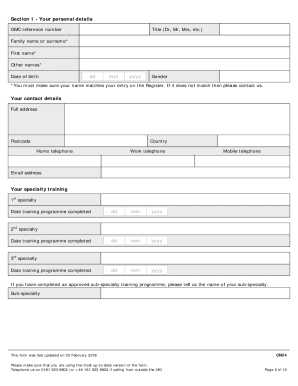
- Begin by filling in your personal details in Section 1. Ensure that your name matches the entry on the Register, and if not, contact the GMC for assistance. Provide your GMC reference number, title, family name, first name, other names, date of birth, and gender.
- Input your contact details, including your full address, postcode, country, home telephone, work telephone, mobile telephone, and email address.
- In Section 2, provide details of all posts you have held since completing training. List your positions in reverse chronological order, starting with the most recent. Include start and finish dates, whether the position was part-time (percentage of whole time equivalent), post title, specialty, institution or hospital, and supervisor's name and title.
- Section 3 requires evidence to support your application. Indicate the documents you plan to submit, such as confirmation of completed training, current competence evidence, and any statements regarding delays in your application.
- In Section 4, list the details of two referees who can provide information regarding your skills and performance. Include their GMC reference number, title, name, post title, specialty, institution or hospital, postal address, and work email.
- Complete Section 5 by answering health-related questions regarding your fitness to practice. Be honest and mark 'yes' or 'no' for each query. If any apply, provide details on the supplementary information sheet.
- In Section 6, declare any cautions, convictions, or health issues that may affect your fitness to practice. As with the previous section, answer truthfully and provide detailed information for any 'yes' responses.
- Finally, in Section 7, confirm the final declaration by reading the statements provided, signing, and dating the section to ensure your application is accurate and true.
- After completing the form, save your changes, download, print, or share the form as needed. Ensure all required evidence is included when submitting your application to the General Medical Council.
Complete the CN24 form online and take the next step in your professional journey.