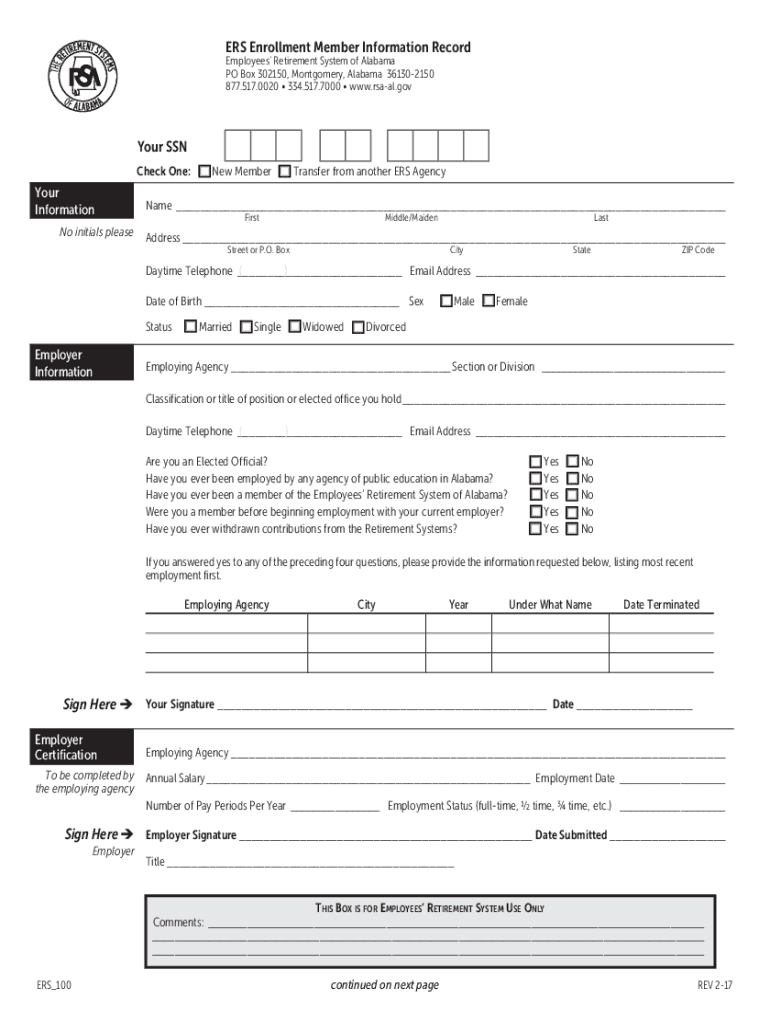
E: q New Member q Transfer from another ERS Agency Your Information No initials please Name First Middle/Maiden Last Address Street or P.O. Box City State ZIP Code Daytime Telephone Email Address ( ) Date of Birth.
Loading

Open form follow the instructions

Easily sign the form with your finger

Send filled & signed form or save
How to fill out the AL ERS Enrollment Member Information Record online
Completing the AL ERS Enrollment Member Information Record is an important step in joining the Employees' Retirement System of Alabama. This guide will provide clear instructions to help you navigate the form seamlessly.
Follow the steps to complete your enrollment form effectively.
- Press the ‘Get Form’ button to access the form and open it for editing.
- Begin by entering your personal information. Provide your full name including first, middle, and last names, without using initials. Fill in your address, including street or P.O. Box, city, state, and ZIP code. Include your daytime telephone number and email address, and record your date of birth along with your sex status (male or female) and marital status (single, married, widowed, or divorced).
- Next, provide your employer information. Fill in your employing agency and section or division details. Include your job classification or title, and repeat the steps of providing your daytime telephone number and email address.
- Answer the yes or no questions regarding your employment history with public education in Alabama and your membership status with the Employees’ Retirement System. If you answered yes to any of the scenarios presented, provide details about your previous employment, including the employing agency, city, year, name under which you were employed, and date of termination.
- Sign the form where indicated to confirm the information you provided is accurate. Also, include the date of your signature.
- For employer certification, the employing agency must complete the annual salary, employment date, the number of pay periods per year, and employment status. Ensure that the employer signs and dates this section.
- Designate your primary beneficiaries by providing their names, relationships to you, dates of birth, and addresses. Repeat this for each primary beneficiary.
- In case your primary beneficiary does not survive you, designate contingent beneficiaries by providing the same details as required for primary beneficiaries.
- Sign the beneficiary designation certification and state the date. This signature should be acknowledged before a notary public, who will complete the notary section.
- Once you have filled out all sections of the form, review the information carefully. Save the changes, then download or print the completed form for your records or submission.
Complete your AL ERS Enrollment Member Information Record online today for seamless processing!
Experience a faster way to fill out and sign forms on the web. Access the most extensive library of templates available.
Related content
AL ERS Aggregate GASB68 2021-2022 Report ... Public Records Request Form · Map/Directions...
Mar 24, 2005 — TRS Enrollment Member Information Record. Teachers' Retirement System of...
Jul 24, 2020 — (c) DD Form 1172–2 (Application for Identification Card/DEERS...
Get answers to your most pressing questions about US Legal Forms API.
Can you withdraw money from retirement systems of Alabama?
You may not withdraw from your account unless you are no longer employed with a state agency or school, are age 70½ or older, have an unforeseeable emergency, or qualify for a small balance withdrawal.
Do Alabama state employees get a pension?
ERS provides retirement benefits to state employees, state police, and, on an elective basis, to qualified persons of cities, towns, and quasi-public organizations.
What is the difference between Tier 1 and Tier 2 retirement system in Alabama?
Tier 1 member: You are eligible to retire at any age with 25 or more years of service or at age 60 with 10 or more years of service. Tier 2 member: You are eligible to retire at age 62 (age 56 for State Police and certified, full-time firefighter and law enforcement officer) with 10 or more years of service.
Is Alabama a retirement friendly state?
If you've been asking yourself if Alabama is tax-friendly for retirees, you now know the answer is a resounding yes! This state is a highly attractive choice for those looking to get the absolute best from their retirement savings.
How long do you have to work for the state of Alabama to retire?
They are eligible for retirement benefits at age 60 with at least 10 years of service. (With 25 years of service, they can retire at any age and apply for full retirement benefits from RSA.)
How many years does it take to be vested in Alabama retirement system?
Members have a vested status in the TRS after accumulating 10 years of creditable service.
How long do you have to work for the state of Alabama to get a pension?
They have a payroll deduction equaling 7.5% of earnable compensation. They are eligible for retirement benefits at age 60 with at least 10 years of service. (With 25 years of service, they can retire at any age and apply for full retirement benefits from RSA.)
What benefits do Alabama state employees get?
Low Cost Insurance Blue Cross/Blue Shield Health (Single/Family Coverage) Optional Dental (Single/Family Coverage) Optional Health and Supplemental Insurance Coverage. Optional Cancer Policy. Discounted Vision Care Program. Flexible Benefits Program (pre-tax dollars for qualified Medical Expense and Dependent Care)
Use professional pre-built templates to fill in and sign documents online faster. Get access to thousands of forms.
If you believe that this page should be taken down, please follow our DMCA take down process here.