Loading
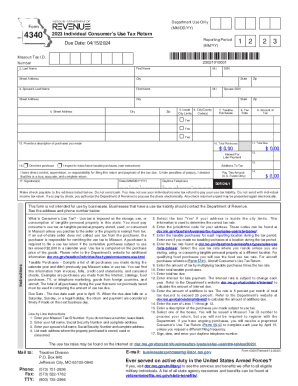
Get Mo 4340 2023-2026
How it works
-

Open form follow the instructions
-

Easily sign the form with your finger
-

Send filled & signed form or save
How to fill out the MO 4340 online
Filing the Missouri 2023 Individual Consumer’s Use Tax Return (MO 4340) online is a straightforward process that allows users to report taxable purchases made throughout the year. This guide will help you navigate each section of the form with ease, ensuring that you provide all necessary information accurately.
Follow the steps to complete the form successfully
- Click ‘Get Form’ button to obtain the form and open it in the designated editor.
- Enter your Missouri Tax ID number in the appropriate field. If you do not have one, leave this field blank.
- Fill in your full name, Social Security number, and complete address.
- Provide your spouse’s full name, Social Security number, and complete address if applicable.
- List every address where the purchased property is stored, used, or consumed.
- Select ‘Yes’ if your address is located inside the city limits, as this will determine the applicable tax rate.
- Input the city/county jurisdiction code for your address. You can find this information on the Department of Revenue's website.
- Enter the total amount of taxable purchases for each location during the reporting period. If you made no taxable purchases, enter zero.
- Look up and enter the appropriate tax rate based on your living situation from the provided resources.
- Calculate the tax amount by multiplying your taxable purchases by the tax rate and enter this amount.
- Total your taxable purchases and enter this figure in the corresponding field.
- Input the total amount of tax due.
- If applicable, enter interest for late payment, based on current rates available on the Department's website.
- Add any additional tax amounts due, as stated on the form, and enter this total.
- Provide a brief description of the purchases made that are subject to use tax.
- Select the appropriate box regarding future taxable purchases and confirm your filing preferences.
- Finalize the form by signing, dating it, and providing your daytime telephone number.
- Once all fields are completed, save changes, and choose to download, print, or share the form as needed.
Start your online filing process for the MO 4340 today to ensure timely and accurate submission.