Loading
Get Information Mapping 's Formatting Solutions Version 1.2. Extracted Pages
How it works
-

Open form follow the instructions
-

Easily sign the form with your finger
-

Send filled & signed form or save
How to fill out the Information Mapping's Formatting Solutions Version 1.2 Extracted Pages online
This guide provides clear instructions for completing the Information Mapping’s Formatting Solutions Version 1.2 Extracted Pages. By following the outlined steps, users will efficiently navigate the required fields and sections of the form online.
Follow the steps to complete the form online with ease.
- Click the ‘Get Form’ button to access the form and open it for editing.
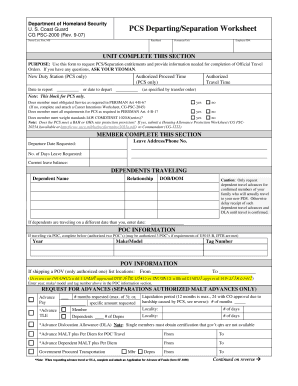
- Begin filling in your personal information including your name, rate/rank, permanent unit, and employee ID number. Ensure accuracy in the details provided.
- Complete the UNIT COMPLETE THIS SECTION. Enter your new duty station and the date you are expected to report. Also, indicate the authorized proceed time and travel time as specified in your transfer order.
- Answer the questions related to your eligibility for PCS, checking either 'yes' or 'no' as applicable. If any 'no' answers are selected, ensure any required attachments, such as the Career Intentions Worksheet, are included.
- Fill out the MEMBER COMPLETE THIS SECTION with your leave address and phone number. Specify the departure date requested, number of days of leave requested, and your current leave balance.
- List any dependents traveling with you, providing their names, relationships, and dates of birth or dependency. If dependents will travel on a different date, include that date as well.
- If you are traveling via privately owned vehicle, complete the POC INFORMATION section by noting the year, make/model, and tag number of your vehicle.
- In the POV INFORMATION section, specify the locations for shipping your POV, entering details for both the origin and destination.
- Under the REQUEST FOR ADVANCES section, indicate the advance pay and TLE requested. Ensure to detail the number of months or specific amount needed.
- Complete any additional sections related to miscellaneous requests, including any government quarters, charge card possession, and household goods shipment.
- Review all completed sections for accuracy. Once all information is filled out, save changes, download a copy, or print the form for submission.
Start completing the Information Mapping's Formatting Solutions Version 1.2 Extracted Pages online today.
The overall process of Information Mapping consists of three major steps: analysis, organization, and presentation.
Industry-leading security and compliance
US Legal Forms protects your data by complying with industry-specific security standards.
-
In businnes since 199725+ years providing professional legal documents.
-
Accredited businessGuarantees that a business meets BBB accreditation standards in the US and Canada.
-
Secured by BraintreeValidated Level 1 PCI DSS compliant payment gateway that accepts most major credit and debit card brands from across the globe.