Loading
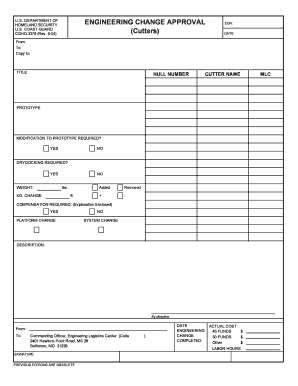
Get Engineering Change Approval (cutters) - U.s. Coast Guard
How it works
-

Open form follow the instructions
-

Easily sign the form with your finger
-

Send filled & signed form or save
How to fill out the ENGINEERING CHANGE APPROVAL (Cutters) - U.S. Coast Guard online
This guide provides clear and comprehensive instructions on how to effectively fill out the ENGINEERING CHANGE APPROVAL (Cutters) form for the U.S. Coast Guard online. Whether you are experienced or new to this process, these steps will help ensure that you complete the document accurately.
Follow the steps to fill out the ENGINEERING CHANGE APPROVAL form
- Press the ‘Get Form’ button to access the ENGINEERING CHANGE APPROVAL form and open it in the editor.
- Enter the Engineering Change Number (ECN) in the designated field at the top of the form.
- Fill in the date for which the form is being completed.
- Indicate the sender by filling in the 'From' section with the relevant details.
- Provide the recipient's information in the 'To' section.
- If necessary, include any additional recipients in the 'Copy to' section.
- Enter an appropriate title for the engineering change in the 'TITLE' field.
- Fill in the Hull Number and Cutter Name in their respective fields.
- Specify the MLC and indicate whether this is a prototype by checking the corresponding box.
- If modification to the prototype is required, select 'YES' or 'NO' accordingly.
- Indicate whether drydocking is required by selecting 'YES' or 'NO' and provide the weight in pounds or kilograms.
- Document any changes in length with the 'ft.' field for added or removed changes.
- If compensation is required, check the yes/no box and provide an explanation if necessary.
- Detail whether there is a platform change or system change, selecting the appropriate option.
- Describe the engineering change in the 'DESCRIPTION' section, providing appropriate context.
- Fill in the direction information: 'By direction,' 'From,' and 'To,' ensuring clarity.
- Complete the section for the Commanding Officer’s address, ensuring all details are correct.
- Fill in the date the engineering change was completed.
- Provide the actual costs in the fields for 45 FUNDS, 30 FUNDS, and other if applicable.
- Indicate the labor hours in the designated field.
- Sign the document to confirm the submission is genuine and accurate.
- Review the completed form for any errors, save changes, and then proceed to download, print, or share as necessary.
Complete your ENGINEERING CHANGE APPROVAL form online today for efficient processing.
Industry-leading security and compliance
US Legal Forms protects your data by complying with industry-specific security standards.
-
In businnes since 199725+ years providing professional legal documents.
-
Accredited businessGuarantees that a business meets BBB accreditation standards in the US and Canada.
-
Secured by BraintreeValidated Level 1 PCI DSS compliant payment gateway that accepts most major credit and debit card brands from across the globe.