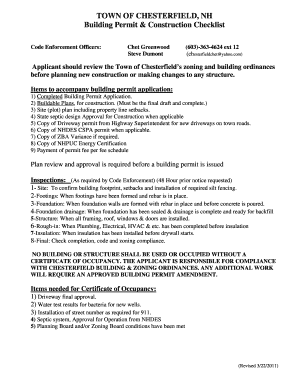
The Town of Chesterfield’s zoning and building ordinances before planning new construction or making changes to any structure. Items to accompany building permit application: 1) Completed Building Permit Application. 2) Buildable Plans, for construction. (Must be the final draft and complete.) 3) Site (plot) plan including property line setbacks. 4) State septic design Approval for Construction when applicable 5) Copy of Driveway permit from Highway Superintendent for new driveways on town roa.
Open form follow the instructions
Easily sign the form with your finger
Send filled & signed form or save
How to fill out the NH Application for Building Permit online
Filling out the NH Application for Building Permit online is a straightforward process designed to ensure that all necessary information is gathered efficiently. This guide will provide step-by-step instructions to help you navigate each section of the application with confidence.
Follow the steps to successfully complete your building permit application.
- Click the ‘Get Form’ button to access the application form and open it in your preferred editing tool.
- Start by entering the location of the project, including the map/lot number, zone, and flood zone information as applicable.
- Provide the owner's name and contact information, including their telephone number and mailing address.
- Next, include the contractor’s information, if applicable, including their name, telephone number, and address.
- Indicate if the application is for additional work related to an existing permit by checking the appropriate box and providing the corresponding permit number.
- Specify the type of project you are applying for, such as new construction, addition, remodel, repair, or demolition.
- Clarify the proposed use of the building and provide the total square footage of the construction.
- Detail the project description in the designated section, making sure to include necessary specifics regarding the work to be done.
- Indicate the type of foundation planned for the project, including options like crawl space, full basement, or finished basement.
- If applicable, provide the driveway permit number and NHDES septic approval number, along with any existing sewage system details.
- Confirm whether the property is in current use or if tree cutting is planned, and provide the intent to cut filed under RSA 79:10.
- Review the certification statement, ensuring you agree to the terms and conditions outlined regarding inspections and completion.
- Finally, provide your signature and date, ensuring that you have printed your name and title underneath.
- Once the form is completed, proceed to save your changes, download it for records, print, or share as necessary.
Start completing your NH Application for Building Permit online today to ensure compliance and streamline your building process.
Experience a faster way to fill out and sign forms on the web. Access the most extensive library of templates available.
Related content
This program covers the permitting, plan review and inspections for all construction work...
N.H. Admin. Code § Saf-C 8103.02 - Form DSFM 106 "State Building Permit Application ·...
by HW Sites · 2000 · Cited by 1 — This order detailed the requirements and remedial...
Get answers to your most pressing questions about US Legal Forms API.
What happens if you build without a permit in New Hampshire?
Building without a permit in New Hampshire can lead to significant consequences, such as fines or the requirement to remove non-compliant structures. Local authorities may also deny your NH Application for Building Permit if they discover previous unauthorized work. Therefore, it's crucial to ensure that you have all necessary permits in place before starting any construction project.
What do I need a building permit for in New Hampshire?
In New Hampshire, you typically need a building permit for new constructions, major renovations, and certain repairs that affect structural elements. The NH Application for Building Permit is crucial for projects such as adding a room, changing the use of a building, or installing new plumbing or electrical systems. It's always best to check with your local building authority to understand specific requirements for your project.
How do I draw a building permit plan?
Creating a building permit plan requires detailed drawings of your project. Start by outlining the dimensions and layout of your space, ensuring compliance with local regulations. You may also find it helpful to utilize professional software or consult with a designer. The information must align with the requirements of the NH Application for Building Permit to ensure approval.
How long does it take to get a building permit in NH?
The time it takes to obtain a building permit in NH can vary. Typically, the NH Application for Building Permit process may take anywhere from a few weeks to a couple of months. Factors affecting this timeline include the complexity of your project and the workload of the local building department. It's advisable to plan ahead and submit your application early to avoid delays.
What do you need a building permit for in NH?
You typically need a building permit in New Hampshire for various projects, including construction of new homes, major renovations, and installations like fences or HVAC systems. Your NH Application for Building Permit ensures you meet local codes, maintain safety standards, and satisfy zoning regulations. It's best to consult with local authorities or use platforms like uslegalforms to navigate the application process effectively.
What happens if you build without a permit New Hampshire?
Building without a permit in New Hampshire can lead to significant consequences, including potential fines and the need to demolish unauthorized structures. Municipalities take building regulations seriously to ensure safety standards. If you find yourself in this situation, you should consult with your local building department immediately to discuss possible solutions and rectify your NH Application for Building Permit status.
What requires a building permit in NH?
In New Hampshire, certain projects require a building permit, including new construction, major renovations, and certain electrical or plumbing work. Your NH Application for Building Permit will be necessary for any significant alterations that modify structural integrity or affect zoning compliance. Remember, even smaller projects may need a permit for safety and regulatory reasons, so it’s always good to double-check.
How do I get a building permit after construction?
If you need a building permit after construction in New Hampshire, the process may differ from traditional permits. First, you should contact your local building department to discuss your situation and understand their specific requirements. They will guide you on submitting the necessary paperwork, including your NH Application for Building Permit, and any inspections needed. It is essential to rectify undocumented work to comply with local regulations.
What requires a building permit in New Hampshire?
In New Hampshire, a building permit is required for projects like new constructions, substantial renovations, and demolitions. Other activities such as installing a new roof, adding a deck, or making significant alterations also typically require a permit. Filing an NH Application for Building Permit provides clarity on what is needed for your specific project, and helps you stay within the law.
What's the biggest size shed without a permit?
In New Hampshire, the maximum size for a shed that doesn’t require a permit is usually 200 square feet. However, this can vary by municipality, so it's essential to check local regulations. To avoid confusion, it's advisable to submit an NH Application for Building Permit if your shed is close to these limits. This ensures compliance and helps you avoid future complications.
Use professional pre-built templates to fill in and sign documents online faster. Get access to thousands of forms.
If you believe that this page should be taken down, please follow our DMCA take down process here.
This form is available in several versions. Select the version you need from the drop-down list below.