Loading
Get Canada Mohawk College Diploma/certificate Replacement Form 2018-2026
How it works
-

Open form follow the instructions
-

Easily sign the form with your finger
-

Send filled & signed form or save
How to fill out the Canada Mohawk College Diploma/Certificate Replacement Form online
This guide provides clear instructions on how to complete the Canada Mohawk College Diploma/Certificate Replacement Form online. With step-by-step guidance, users will find it simple to fill out each section accurately.
Follow the steps to successfully complete the replacement form.
- Press the ‘Get Form’ button to obtain the form and open it in your preferred online editor.
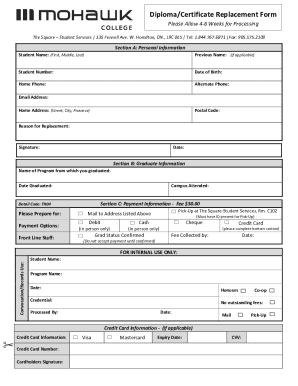
- In Section A, enter your personal information. Fill in your student name, any previous name (if applicable), student number, date of birth, home phone, alternate phone, email address, home address, postal code, and the reason for replacement. Ensure all your details are accurate.
- Proceed to Section B and provide information regarding your graduate details. Indicate the name of the program from which you graduated and the date of graduation. Include the campus you attended.
- In Section C, you will find payment information. Note that there is a fee of $30.00. Choose your preferred payment option from the options available. You must complete the necessary details.
- Once all the sections are completed, review the entire form for accuracy. Ensure that you have included your signature and date at the end of the form.
- Save your changes, and select the appropriate option to download, print, or share the form for submission.
Complete your documents online today to ensure a smooth replacement process for your diploma or certificate.