Loading
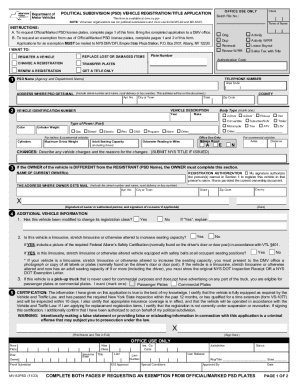
Get Ny Mv-82psd 2023-2026
How it works
-

Open form follow the instructions
-

Easily sign the form with your finger
-

Send filled & signed form or save
How to fill out the NY MV-82PSD online
This guide provides detailed instructions on how to accurately complete the NY MV-82PSD form online. Whether you are registering a vehicle or requesting an exemption, this step-by-step guide is designed to support you through the process.
Follow the steps to fill out the NY MV-82PSD form online
- Press the ‘Get Form’ button to access the NY MV-82PSD and open it in your preferred editor.
- On the first page, choose your reason for completing the form by selecting one of the options under 'I WANT TO:' such as 'Register a vehicle' or 'Replace lost or damaged items'. Fill out the corresponding fields based on your selection.
- Enter your contact information, including the agency or department name, telephone number, and mailing address where the political subdivision receives mail. Ensure to include the street number, city, county, state, and zip code.
- Provide detailed vehicle description by filling out the vehicle identification number (VIN), year, body type, make, type of power (fuel), color, unladen weight, cylinders, and other specific details as required.
- If the owner of the vehicle differs from the registrant, complete the section requiring the owner's details including their name, mailing address, and signatures.
- Answer the questions regarding any modifications or special uses of the vehicle, ensuring to include required certifications or supporting documents as specified.
- Complete the certification section on the form by signing and printing your name, affirming that the information provided is accurate.
- Once all sections are completed, save your changes, and choose to download, print, or share the form as needed.
Complete and submit your documents online for a seamless experience.
You can renew online prior to or up to one year past the expiration date.