Loading
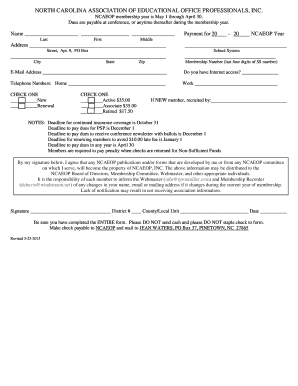
Get Nc Ncaeop Membership 2015
How it works
-

Open form follow the instructions
-

Easily sign the form with your finger
-

Send filled & signed form or save
How to fill out the NC NCAEOP Membership online
The North Carolina Association of Educational Office Professionals (NCAEOP) offers an online membership form for users to join or renew their membership. This guide provides step-by-step instructions to complete the NC NCAEOP Membership form accurately and efficiently.
Follow the steps to complete your NC NCAEOP Membership form online
- Press the ‘Get Form’ button to access the membership form. This action opens the online document for you to begin filling it out.
- Enter your name accurately in the designated fields: Last name, First name, and Middle name.
- Fill in your complete address, including Street, Apartment or PO Box, City, State, and Zip code.
- Indicate the NCAEOP year you are applying for.
- Provide your School System name.
- Input your last four digits of your Social Security number in the Membership Number field.
- Enter your email address, ensuring it is valid for communication.
- Answer whether you have Internet access by marking 'Yes' or 'No'.
- Fill in your Home and Work telephone numbers.
- Select whether you are a New member or a Renewal by checking the appropriate box.
- Choose your membership type by checking one of the following options: Active ($35.00), Associate ($35.00), or Retired ($17.50).
- If you are a new member, write down the name of the person who recruited you.
- Review the important notes regarding deadlines for payments and coverage. Be aware of consequences for late payments.
- Sign the form, providing your District number, County/Local Unit, and the date.
- Ensure that you have completed the entire form before submission; do not send cash or staple your check.
- Finalize the process by saving your changes. You may then download, print, or share the completed form as necessary.
Complete the NC NCAEOP Membership document online today!
Get form
Experience a faster way to fill out and sign forms on the web. Access the most extensive library of templates available.
Yes, gym memberships in North Carolina are generally subject to sales tax. When considering your choices, keep this in mind as it affects total costs. If you’re exploring options under your NC NCAEOP Membership, being aware of these taxes can help you manage your expenses effectively. Always confirm with your gym about potential taxes on your membership.
Get This Form Now!
Use professional pre-built templates to fill in and sign documents online faster. Get access to thousands of forms.