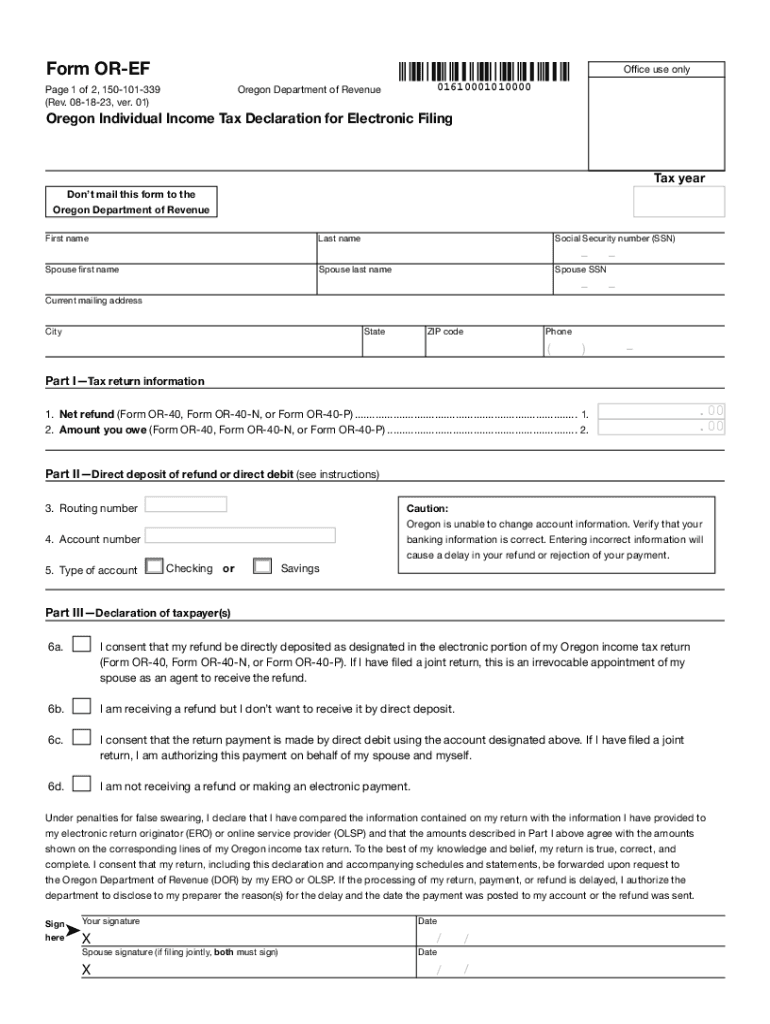
Clear formForm OREFOffice use onlyPage 1 of 2, 150101339 (Rev. 081823, ver. 01)01610001010000Oregon Department of RevenueOregon Individual Income Tax Declaration for Electronic FilingTax year Dont.

Open form follow the instructions

Easily sign the form with your finger

Send filled & signed form or save
How to use or fill out the OR Form OR-EF online
This guide provides clear and supportive instructions on how to fill out the OR Form OR-EF online. By following these steps, users can accurately complete their Oregon Individual Income Tax Declaration for Electronic Filing.
Follow the steps to fill out the OR Form OR-EF online
- Press the ‘Get Form’ button to obtain the OR Form OR-EF and open it in your preferred online editor.
- Fill in the tax year for which you are filing the declaration. Ensure that this matches the year of your tax return.
- Enter your first name, last name, and Social Security number (SSN) in the designated fields.
- If applicable, provide your spouse’s first name, last name, and SSN.
- Provide your current mailing address, including city, state, and ZIP code, in the respective sections.
- Input your phone number, ensuring to include area code.
- Part I: Fill in your net refund amount and the amount you owe as indicated on Forms OR-40, OR-40-N, or OR-40-P.
- Part II: For direct deposit or debit, include your bank’s routing number and your account number. Select whether it is a checking or savings account.
- Part III: Review and select the appropriate declaration options based on your refund preferences and electronic payment consent.
- Sign and date the form; if you are filing jointly, include your spouse's signature and date.
- Part IV: If applicable, have your electronic return originator or paid preparer complete their declaration, including their signature and date.
- Once you have completed the form, save the changes, and download or print the document as needed.
Complete your OR Form OR-EF online today for a smooth filing experience.
Experience a faster way to fill out and sign forms on the web. Access the most extensive library of templates available.
Related content
8879, the taxpayer must use Form OR-EF to electronically sign their Oregon return. Form...
Form OR-EF, Oregon Individual Income Tax Declaration for Electronic Filing, 150-101-339...
Use this Form FDA 3542a only if the NDA applicant is submitting information on a patent...
Get answers to your most pressing questions about US Legal Forms API.
How do I get a copy of my Oregon state tax return?
Use Form 4506, Request for Copy of Tax Return, to request copies of tax returns. Automated transcript request. You can quickly request transcripts by using our automated self-help service tools. Please visit us at IRS.gov and click on “Get a Tax Transcript...” under “Tools” or call 1-800-908-9946.
Does Oregon have e-file authorization form?
Federal Form 8879 - IRS e-file Signature Authorization If a return is not signed electronically, the taxpayer must use Oregon Form EF - Oregon Individual Income Tax Declaration for Electronic Filing. Oregon Form EF is to be signed and retained by the taxpayer and tax preparer.
What is Oregon Resident tax return form 40?
Use Form 40 to change (amend) your full-year resident return. Check the amended return box in the upper left corner of the form. You must also complete and include the Oregon Amended Schedule with your amended return. For prior year tax booklets or the Oregon Amended Schedule, please visit our website or contact us.
How do I get my Oregon form 40?
Options for obtaining State tax forms and instructions: Download forms from the Oregon Department of Revenue website .oregon.gov/dor. Order forms by calling 1-800-356-4222. Contact your regional Oregon Department of Revenue office.
What form is used for Oregon employee withholding?
Use Form OR-W-4 to tell your employer or other payer how much Oregon income tax to withhold from your wages or other periodic income. Instructions for employer or other payer. Enter the business name, federal employer identification number (FEIN), and address in the “Employer use only” section of Form OR-W- 4.
What is an Oregon form 40n?
2021 Form OR-40-N, Oregon Individual Income Tax Return for Full-year Residents, 150-101-048.
How long to get Oregon tax refund 2023?
Most taxpayers in Oregon will receive their refund within 21 days of filing electronically, but others may have to wait longer.
What is form 40p Oregon?
Part-year residents Use Form OR-40-P if any of the following are true: You're a part-year resident who isn't filing a joint return. You're married and filing a joint return, and you and your spouse are part-year Oregon residents, or one spouse is a full-year Oregon resident and the other is a part-year resident.
Use professional pre-built templates to fill in and sign documents online faster. Get access to thousands of forms.
If you believe that this page should be taken down, please follow our DMCA take down process here.