Loading
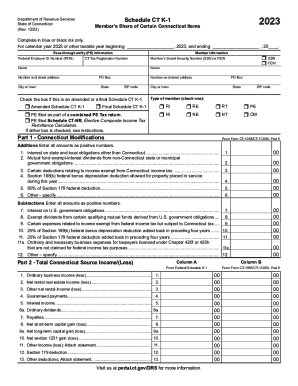
Get Ct Drs Schedule Ct K-1 2023-2026
How it works
-

Open form follow the instructions
-

Easily sign the form with your finger
-

Send filled & signed form or save
How to fill out the CT DRS Schedule CT K-1 online
Filling out the CT DRS Schedule CT K-1 online can seem daunting, but understanding its structure can simplify the process. This guide provides clear and supportive steps to ensure that you accurately complete the form, making the experience as streamlined as possible.
Follow the steps to fill out your Schedule CT K-1 correctly
- Click ‘Get Form’ button to obtain the form and open it in the editor.
- Start by completing the member information section with your name, address, and relevant identification numbers such as your Social Security Number or Federal Employer Identification Number. Check the appropriate box to indicate if you are using an SSN or FEIN.
- Fill in the pass-through entity (PE) information, including the Federal Employer ID Number and Connecticut Tax Registration Number.
- Indicate whether this Schedule CT K-1 is an amended or final version by checking the corresponding box.
- In Part 1, enter the Connecticut modifications. Record any additions or subtractions according to the instructions, ensuring all amounts are entered as positive numbers.
- In Part 2, report the total Connecticut source income or loss. Fill in the amounts from your federal Schedule K-1 and the Connecticut dataset where applicable.
- For Part 3, input the Connecticut PE Tax Credit information as provided by the pass-through entity, ensuring it is accurate.
- If applicable, complete Part 4, detailing elective composite income tax information exclusively for nonresident individuals.
- In Part 5, summarize any Connecticut income tax credits earned in the year, catering to all credits that may apply.
- Complete Part 6 with any additional information required, specifically tailored for nonresident, noncorporate members and PEs.
- Finally, review all entries for accuracy and completeness, then save changes, download, print, or share the form as needed.
Complete your documents online today and ensure your filing is accurate and timely.